¶ Install Script Schema
Install scripts are JSON objects with the following structure. Scripts can use various macros (template variables) that are dynamically replaced during processing.
Tip: Install scripts live in the hexos-app-catalog repository. See Contributing for how to submit new scripts.
¶ Root properties
version(required): Schema version. Must be4,5, or6. Versions 1-3 are deprecated. Use6for hooks, user-triggerable actions, or widgets;5for lifecycle-only hooks;4for neither.custom(optional): Set totruefor community/custom apps that aren't in the default TrueNAS cataloginternal(optional): Set totruefor dev/test apps — hidden in productionmetadata(required ifcustom: true): Custom app metadata (see Custom App Metadata)script(required): Metadata about the install script itselfversion(required): Semantic version of this install script (e.g., "1.0.0", "2.1.3")updateCompatibility(optional): Semver range expression defining which script versions can update to this version (e.g., ">=1.0.0" allows updates from any version 1.0.0 or higher, "^2.0.0" allows updates from 2.x.x versions). Supports all semver range syntax including>=,>,<,<=,^,~, and complex ranges like">=1.0.0 <3.0.0"changeLog(optional): Description of changes in this version of the script
requirements(required): System requirements that are validated before installationinstallation_questions(optional): Array of questions to ask the user during installationensure_directories_exists(optional): Array of directory entry objects to create before installation, with optional ownership and snapshot declarationsapp_values(required): Configuration object passed directly to TrueNAS APIhooks(optional, V5 and V6): Array of hook declarations. V5 declares lifecycle hooks in the V5 dialect; V6 declares the melded family — one declaration covers lifecycle automation and user-triggerable actionswidgetsSchema(optional, V6): Widget declaration vocabulary version. Must be2— any other value means this platform reads none of the app's widgetswidgets(optional, V6): Array of widget declarations. RequireswidgetsSchema
¶ Available macros
Install scripts support various macros that are replaced dynamically during script processing:
¶ Basic macros
$SERVER_LAN_IP: Server's LAN IP address$SERVER_HOST_ID: Server's unique host ID$LOCATION(locationId): Resolves to configured location path$RANDOM_STRING(length): Generates random alphanumeric string$MEMORY(percentage, minimum_mb): Calculates memory allocation$HOST_PATH(path): Creates host path configuration object$MOUNTED_HOST_PATH(path, mount_point): Creates mounted host path configuration
¶ Conditional macros
$APP_INSTALLED(appName): Returns "true" or "false" if app is installed$QUESTION(key): References user's response to installation question$IF(condition, trueValue, [falseValue]): Conditional logic with support for:- Boolean literals:
true,false - Negation:
!condition - App checks:
$APP_INSTALLED(appName) - Question values:
$QUESTION(key) - Equality:
value1 == value2 - Inequality:
value1 != value2 - AND logic:
$IF(["condition1", "condition2"], trueValue, falseValue, "AND") - OR logic:
$IF(["condition1", "condition2"], trueValue, falseValue, "OR")
- Boolean literals:
For detailed macro documentation and examples, see the Macros Reference.
¶ Custom app metadata
When custom: true, the metadata object is required:
| Property | Type | Required | Description |
|---|---|---|---|
name |
string | Yes | Display name in the HexOS app store |
description |
string | Yes | Brief description of what the app does |
icon |
string | Yes | URL to the app's icon (SVG or PNG) |
version |
string | Yes | Semantic version of the custom app |
¶ Example structure
For complete, working examples of install scripts, browse the hexos-app-catalog repository. These production-ready scripts demonstrate best practices and real-world usage patterns for popular applications like Plex, Jellyfin, Immich, and more.
¶ Requirements
The requirements object defines system requirements that HexOS validates before allowing app installation. This ensures users have properly configured their system with the necessary locations, resources, and permissions.
Requirements Object Properties:
locations(array): Required folder locations that must be configured in HexOS Settingsspecifications(array): Minimum hardware/resource specifications neededpermissions(array): Special permissions the app needsports(array): Network ports that must be available
¶ Locations
Locations are folder paths configured in HexOS Settings > Locations. Each location maps to a specific use case:
Available Locations:
ApplicationsPerformance: High-performance storage for app data (typically SSD)ApplicationsCapacity: High-capacity storage for app data (typically HDD)Media: General media filesPhotos: Photo library storageMusic: Music library storageMovies: Movie library storageShows: TV show library storageVideos: Video library storageDownloads: Download directoryDocuments: Document storageBackups: Backup storage
Important: Every $LOCATION() macro used anywhere in your install script (in ensure_directories_exists, app_values, etc.) must be listed in the locations requirements array.
Example:
{
  "requirements": {
    "locations": ["ApplicationsPerformance", "Photos", "Media"]
  },
  "ensure_directories_exists": [
    { "path": "$LOCATION(ApplicationsPerformance)/immich/config", "owner": { "user": "apps" } },
    { "path": "$LOCATION(Photos)/immich", "owner": { "user": "apps" } }
  ],
  "app_values": {
    "storage": {
      "config": "$HOST_PATH($LOCATION(ApplicationsPerformance)/immich/config)",
      "photos": "$HOST_PATH($LOCATION(Photos)/immich)",
      "additional_storage": [
        "$MOUNTED_HOST_PATH($LOCATION(Media), /media)"
      ]
    }
  }
}
¶ Specifications
Hardware and resource specifications ensure the system meets minimum requirements:
Available Specifications:
100MB,200MB,500MB,1GB,2GB: Minimum storage space needed1CORE,2CORE,4CORE,8CORE: Minimum CPU cores requiredGPU: Requires GPU hardware (for transcoding, ML, etc.)
Example:
{
  "requirements": {
    "specifications": ["2CORE", "200MB", "GPU"]
  }
}
¶ Permissions
Special permissions that the app requires to function:
Available Permissions:
READ_WRITE_LOCATIONS: App needs read/write access to configured locations
Example:
{
  "requirements": {
    "permissions": ["READ_WRITE_LOCATIONS"]
  }
}
¶ Ports
Network ports that the application will use. HexOS can validate port availability before installation.
Example:
{
  "requirements": {
    "ports": [8080, 8443]
  }
}
¶ Complete requirements example
{
  "version": 4,
  "requirements": {
    "locations": [
      "ApplicationsPerformance",
      "ApplicationsCapacity",
      "Media",
      "Photos",
      "Music",
      "Movies",
      "Shows",
      "Videos"
    ],
    "specifications": ["2CORE", "200MB", "GPU"],
    "permissions": ["READ_WRITE_LOCATIONS"],
    "ports": [32400]
  }
}
¶ Requirements validation
When users attempt to install an app, HexOS performs the following checks:
-
Location Validation: Verifies that all required locations are configured in Settings > Locations
- If a location is not configured, it will be marked as "unmet"
- Users must configure missing locations before installation can proceed
- The install script's
ensure_directories_existswill create subdirectories within configured locations
-
Specifications Check: Validates system meets minimum hardware requirements (coming soon)
-
Permissions Check: Confirms the app has necessary permissions (coming soon)
-
Port Availability: Validates required ports are available (coming soon)
Important: The ensure_directories_exists section of your install script will only create subdirectories and files. It does not create the base location paths themselves. Users must configure these locations in HexOS Settings first, and your requirements validation ensures this happens before installation begins.
¶ Installation questions
Installation questions allow you to prompt users for configuration values during app installation. Question responses can be referenced in app_values using the $QUESTION(key) syntax.
Installation questions dialogue
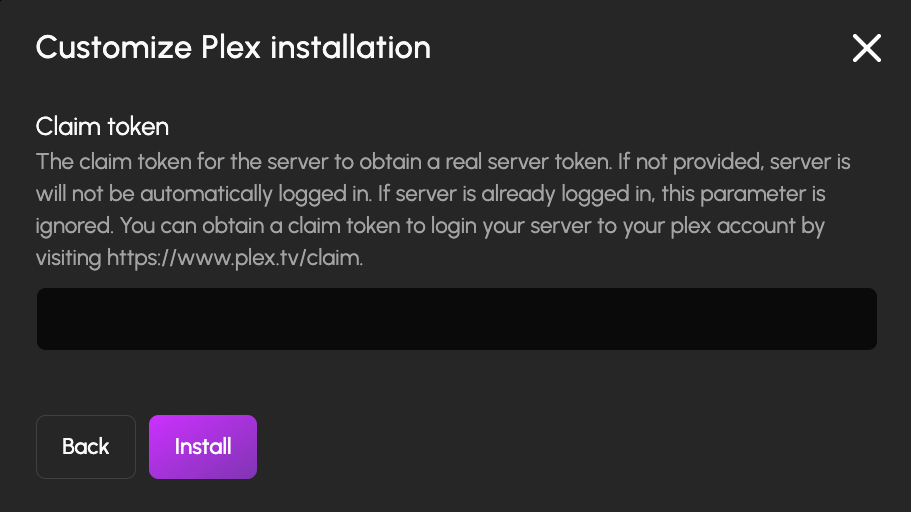
Example of installation questions displayed during app installation
Question Object Properties:
question(required): The question text shown to the userdescription(optional): Additional help text explaining the questionplaceholder(optional): Placeholder text for input fieldstype(required): Question type - one of:"text": Text input field"number": Numeric input field"select": Dropdown/selection with predefined options"boolean": True/false toggle"password": Masked text input. A$RANDOM_STRING(n)default offers a generated value
key(required): Unique identifier used to reference the answer with$QUESTION(key)options(required forselecttype): Array of option objects withtextandvaluepropertiesrequired(optional): Whether the question must be answered (default: false)default(optional): Default value or special syntax like$RANDOM_STRING(16)installonly(optional): Set totruefor values the app only consumes on first boot (e.g. initial admin credentials). The question is still asked during install (including custom install and reinstall), but is hidden from the post-install Options/Configure dialog, where changing it would have no effect. The question's$QUESTION(key)reference should appear inapp_valuesso the current value stays recoverable from the installed app's configuration during updates.group(optional): Splits a long list of questions into steps and sections in the install workflow. Without it, every question appears on one screen. With it, the workflow shows one dot per step, and each screen holds a handful of inputs, so an app with dozens of questions reads as a short flow instead of one long form.
Grouping format:
The value is "Step" or "Step / Section". The text before the spaced slash names the step; the text after it names a section within that step. Questions with the same step text share a step, and questions with the same full value share a section.
{ "question": "Admin username", "type": "text", "key": "admin_user", "group": "Server / Access" },
{ "question": "Admin password", "type": "password", "key": "admin_pass", "group": "Server / Access" },
{ "question": "Web port", "type": "number", "key": "web_port", "group": "Server / Network" },
{ "question": "Library path", "type": "text", "key": "library", "group": "Storage" }
This produces two steps. The first holds two sections, Access (username and password) and Network (port), shown in a clickable rail beside the form. The second, from the plain "Storage" value, has a single section, so the form fills the screen with no rail.
What the user sees:
- The step name is not displayed. It only decides which questions share a dot in the workflow.
- Section names appear in the rail, and only when a step has more than one section.
- A question with a plain
"Step"value that shares its step with"Step / Section"questions appears in the rail as General.
Steps and sections appear in the order their first question is listed. Only the first / in a value splits it, and the slash must have a space on each side, so "TCP/IP settings" stays one name.
Grouping is presentational only. It has no effect on the install payload or on $QUESTION() references. It applies to the standard install flow; the custom install dialog and the post-install Options dialog show every question on one screen regardless of group.
Using Question Responses:
Reference question responses in your app_values using the $QUESTION(key) syntax:
{
  "installation_questions": [
    {
      "question": "Web Port",
      "type": "number",
      "key": "web_port",
      "default": 8080
    }
  ],
  "app_values": {
    "network": {
      "web_port": {
        "port_number": "$QUESTION(web_port)"
      }
    }
  }
}
Using Questions in Conditionals:
Question responses can be used in conditional logic with the $IF macro. See the $IF macro documentation for examples of using questions in conditional expressions.
¶ Directory creation, ownership, and snapshots
Each entry in ensure_directories_exists is an object with the following properties:
path(required): Directory path, typically using$LOCATION()macrosnetwork_share(optional): Boolean, whether to expose as a network shareowner(optional): Object specifying the TrueNAS user and group that should own this directoryuser(required): TrueNAS username (e.g.,"apps","netdata")group(optional): TrueNAS group name (e.g.,"docker"). If omitted, uses the user's default group
snapshot(optional): Object with anidfield. When present, HexOS snapshots this dataset before app updates so support can assist with restoring your application and data if something goes wrongid(required): Identifier included in the snapshot name and metadata (e.g.,"db","config")
Example:
{
  "ensure_directories_exists": [
    { "path": "$LOCATION(Photos)", "network_share": true },
    { "path": "$LOCATION(ApplicationsPerformance)", "network_share": true },
    { "path": "$LOCATION(Photos)/immich", "owner": { "user": "apps" }, "snapshot": { "id": "data" } },
    { "path": "$LOCATION(ApplicationsPerformance)/immich/postgres_data", "owner": { "user": "netdata", "group": "docker" }, "snapshot": { "id": "db" } },
    { "path": "$LOCATION(ApplicationsPerformance)/immich/config", "owner": { "user": "apps" }, "snapshot": { "id": "config" } }
  ]
}
How owner works:
- HexOS calls
user.get_user_objand optionallygroup.get_group_objon the TrueNAS system to resolve usernames and group names to numeric uid/gid - After
app.updatecompletes, HexOS verifies and repairs ownership on declared paths if TrueNAS changed it - If a path has a POSIX1E ACL (legacy), HexOS automatically migrates it to NFS4 with
aclmode: PASSTHROUGH, snapshots the dataset first as a rollback point, then applies the canonical ACL with the declared uid/gid - Only applies to app-specific paths (4+ path segments, e.g.,
/mnt/pool/location/app/data) — location roots are never modified - Paths without
ownerare created with default permissions and not tracked for repair
How snapshot works:
- Before any app update, HexOS snapshots each dataset with a
snapshotconfig so support can assist with restoring your application and data if something goes wrong - Snapshots are named
hexos-app-{appId}-{id}-{timestamp}and stamped with metadata:hexos:purpose,hexos:app,hexos:snapshot_id,hexos:path - Only the latest 3 snapshots per app per dataset are kept — older snapshots are automatically pruned after each new snapshot
- Only applies to app-specific paths (4+ path segments) — location roots are never snapshotted
¶ App values
This object is passed directly to TrueNAS's app installation API. The structure varies by application and corresponds to the app's configuration schema in the TrueNAS apps repository. For example, you can see Plex's schema for the storage property here.
¶ Conditional configuration
Install scripts support conditional logic to customize app configuration based on:
- Other installed apps using
$APP_INSTALLED(appName) - User responses to installation questions using
$QUESTION(key) - Complex conditions using the
$IFmacro
¶ Hooks (V5)
In V5, each entry in hooks declares one lifecycle hook keyed by a singular event — one of onBeforeInstall, onAfterInstall, onBeforeUpgrade, or onAfterUpgrade.
{
  "version": 5,
  "hooks": [
    {
      "id": "configure-myapp",
      "event": "onAfterInstall",
      "script": "myapp/myapp_hook.ts",
      "entrypoint": "afterInstall",
      "timeout": 120,
      "description": "Setting up MyApp",
      "optional": true
    }
  ]
}
Fields: id, event, script / scriptContent, entrypoint, condition, timeout, description, optional, retries, inputs, userOptional. See the Hooks Reference for each one in detail.
¶ Hooks (V6)
V6 declares everything through one shape — a hook. Its events decide when it runs; a hook whose events include userAction is user-triggerable, and its surfaces decide where the user can fire it.
Users see user-triggerable hooks as the app's Actions in the interface.
{
  "version": 6,
  "hooks": [
    {
      "id": "connect-seer",
      "title": "Connect to Seer",
      "description": "Link this Plex server to Seer so requests and discovery use your library.",
      "kind": "connect",
      "conditions": [
        { "role": "visibility", "type": "appInstalled", "app": "seerr" },
        { "role": "availability", "type": "appRunning", "app": "seerr" },
        { "role": "availability", "type": "appRunning", "app": "plex" }
      ],
      "rerun": "converge",
      "script": "plex/connect_seer.ts",
      "entrypoint": "run",
      "timeout": 300,
      "retries": 0
    }
  ]
}
¶ Declaration properties
| Property | Type | Required | Description |
|---|---|---|---|
id |
string | Yes | Unique within the dictionary. Load-bearing — consent opt-ins, task history, rerun keys, and widget button references all key off it |
title |
string | Yes | User-facing name: the button label, the install-picker row, the consent checkbox label |
description |
string | No | Explanatory text. Also the progress label while the hook runs, falling back to title |
kind |
string | No | connect, maintain, or custom. Descriptive only — used for icons and grouping, never for behavior |
events |
array | No | When the hook fires (see Events). Absent means ["userAction"] |
optional |
boolean | No | Lifecycle firings only: skip on failure or input timeout instead of blocking the ceremony |
userOptional |
object | No | Consent checkbox in the install dialog (see userOptional). Requires an install event |
conditions |
array | No | Visibility and availability gates (see Conditions) |
surfaces |
array | No | Narrows where a user-triggerable hook appears (see Surfaces). Absent means derived |
inputs |
array | No | OAuth or question inputs collected from the user before execution — same shapes as V5 |
requiresHooks |
array | No | Up to 8 same-app hook ids this hook depends on. The install dialog gates this hook's row on those hooks' consent toggles, and their collected inputs carry over so matching input keys never re-prompt |
target |
object | No | File selection contract (see Targets). User-fired only |
rerun |
string | Conditional | idempotent, converge, or refuse. Required if the hook is user-triggerable, rejected if it isn't |
script |
string | No | Path to a .ts file in the catalog repo (e.g., "plex/connect_seer.ts") |
scriptContent |
string | No | Inline TypeScript embedded directly in the JSON |
entrypoint |
string | Yes | Name of the exported async function to call |
timeout |
number | No | Maximum execution time in seconds (default: 300) |
retries |
number | No | Automatic retry attempts on failure (default: 0) |
Every hook must have exactly one of script or scriptContent — never both, never neither.
rerun describes what a second run means: refuse blocks a run while a completed run already exists for the same app, hook, and target; idempotent and converge always allow one. Failed and dismissed runs never block — refuse protects a successful one-time setup from running twice, not the user from retrying a failure.
¶ Events
Each entry in events is either a string or an object.
| Event | When it fires |
|---|---|
userAction |
A person presses it from a surface — app card, install picker, file browser, or widget button |
onBeforeInstall |
Before app.create is called on TrueNAS |
onAfterInstall |
After app.create completes successfully |
onBeforeUpgrade |
Before app.upgrade is called on TrueNAS |
onAfterUpgrade |
After app.upgrade completes successfully |
The object form is legal for any lifecycle event and carries per-trigger configuration:
| Property | Type | Required | Description |
|---|---|---|---|
event |
string | Yes | One of the four lifecycle events above |
from |
string | No | Semver range matching the version being departed. Upgrade events only |
to |
string | No | Semver range matching the version being installed. Upgrade events only |
"events": [{ "event": "onBeforeUpgrade", "from": "< 2.0.0", "to": ">= 2.0.0" }]
Trigger rules:
from/toon an install event is rejected — they gate upgrade transitions only- A version-gated trigger cannot share a declaration with
userAction— a one-time migration must not double as a forever-button. Split the manual escape hatch into its own declaration onBeforeInstallandonAfterInstallcannot share a declaration; neither canonBeforeUpgradeandonAfterUpgrade. Split them into two declarations with distinct ids- The same event may not appear twice in one
eventsarray - The V5 singular
eventfield inside a V6 entry is a validation error, not a silent no-op - V5's declaration-level
condition: { fromVersionRange, toVersionRange }has no V6 equivalent — the gate lives on the event object asfrom/to. A leftoverconditionfield is ignored, and the hook would fire on every upgrade
¶ Conditions
Conditions gate a hook against live system state. Every condition carries a role: visibility hides the hook entirely, availability shows it disabled with a reason.
| Type | Extra properties | Passes when |
|---|---|---|
appInstalled |
app (string) |
That app is installed |
appRunning |
app (string) |
That app is installed and running |
appVersion |
app (string), range (semver range) |
The installed app's version satisfies the range |
capabilityPresent |
capability (string) |
The named capability is present |
script |
script (string), entrypoint (string, optional) |
A local-side script predicate returns true |
Every predicate must pass. A failing visibility condition hides the hook; a failing availability condition disables it with a reason. Hidden implies unavailable.
Condition evaluation fails closed: any predicate the platform cannot evaluate — including a type it doesn't recognize at all — counts as false rather than breaking the dictionary. appInstalled and appRunning are the predicates evaluated today; a hook gated on appVersion, capabilityPresent, or script will never pass its gate, so build on the first two.
Two combinations are rejected outright:
- An
appVersioncondition on the declaring app, on a hook with an upgrade trigger. Conditions evaluate the post-upgrade version, so it would never fire — put the gate on the trigger entry ({ "event": ..., "from": ..., "to": ... }) instead - A condition referencing another app, on a hook with any lifecycle trigger. Cross-app connects run from the install picker; remove the lifecycle trigger
¶ Targets
A target makes the hook act on user-selected files, surfacing it in the file browser instead of on the app card.
| Property | Type | Required | Description |
|---|---|---|---|
type |
string | Yes | files |
accepts |
array | Yes | Lowercase extensions with a leading dot (e.g. [".mkv", ".avi"]). The hook is offered only when every selected file matches |
maxFiles |
number | No | Maximum files per invocation (default: unlimited) |
requiresTargetMount |
boolean | No | Whether the app must see the files at a mounted path (default: true). When true, a file the app can't reach makes the hook unavailable and the engine pre-resolves the container path. Set false for watch-folder style hooks that deliver the files themselves |
A target is user-fired only — declaring one alongside a lifecycle trigger is rejected, since a lifecycle firing has no file selection.
{
  "id": "convert-to-mp4",
  "title": "Convert to MP4",
  "kind": "custom",
  "target": {
    "type": "files",
    "accepts": [".mkv", ".avi", ".mov", ".webm"],
    "maxFiles": 5,
    "requiresTargetMount": true
  },
  "conditions": [{ "role": "availability", "type": "appRunning", "app": "fileflows" }],
  "rerun": "converge",
  "script": "fileflows/convert_to_mp4.ts",
  "entrypoint": "run",
  "timeout": 3600
}
¶ Surfaces
surfaces is an array of installPicker, card, fileBrowser, and widget. Most declarations omit it, because the placement is derived from the declaration itself:
| Declaration | Derived surfaces |
|---|---|
Has a target |
fileBrowser |
| Has conditions referencing another app | installPicker, card, widget |
| Anything else user-triggerable | card, widget |
When present, surfaces replaces the derived list — write it to narrow placement, not to invent one. A hook narrowed away from installPicker never becomes a cross-app pairing, and listing installPicker on a hook whose conditions reference no other app produces no pairing either: pairings are derived from the conditions.
A hook with no userAction event surfaces nowhere — pure ceremony never becomes a verb.
¶ userOptional (V6)
userOptional renders a consent checkbox in the install dialog. The checkbox label is the hook's title; description is the consent body in its own register (a terms-acceptance clause, for example), falling back to the hook's description when absent.
| Property | Type | Required | Description |
|---|---|---|---|
description |
string | No | Consent text shown below the checkbox |
default |
boolean | No | Whether the checkbox starts checked (default: true) |
link.url |
string | Yes (within link) |
Fully qualified URL |
link.label |
string | Yes (within link) |
Clickable text rendered inline at the end of the description |
userOptional requires an install trigger (onBeforeInstall or onAfterInstall) — the checkbox renders nowhere else.
{
  "id": "configure-plex",
  "title": "Pre-configure Plex",
  "description": "Setting up Plex server",
  "events": ["onAfterInstall"],
  "optional": true,
  "userOptional": {
    "description": "Sign in to your Plex account to automatically claim your server, set preferences, and create media libraries. By enabling this, you agree that HexOS will accept the Plex Terms of Service on your behalf.",
    "default": true,
    "link": {
      "url": "https://www.plex.tv/about/privacy-legal/plex-terms-of-service/",
      "label": "Plex Terms of Service"
    }
  },
  "script": "plex/plex_hook.ts",
  "entrypoint": "afterInstall",
  "timeout": 300
}
¶ Field availability by firing class
| Field | Requires |
|---|---|
optional |
At least one lifecycle event |
userOptional |
An install event |
target |
No lifecycle event (user-fired only) |
rerun |
A userAction event — and is required when one is present |
¶ Parse tolerance
A hook that fails validation is dropped on its own, with its error reported — the rest of the dictionary still parses and installs. Two behaviors worth knowing while authoring:
- An unrecognized entry inside
eventsis dropped as future vocabulary. If that leaves a declaration with no recognized events, the whole declaration is dropped rather than defaulting to["userAction"]— a typo'd lifecycle hook never silently becomes a card button - Duplicate
idvalues within one dictionary are reported as errors
¶ Widgets (V6)
Widgets are read-only dashboard glances: a cached query per widget, rendered by the platform's size templates. They are declared in the same dictionary as hooks, gated by widgetsSchema.
{
  "version": 6,
  "widgetsSchema": 2,
  "widgets": [
    {
      "id": "now-playing",
      "title": "Now playing",
      "description": "Active Plex streams right now.",
      "refresh": 10,
      "conditions": [{ "role": "availability", "type": "appRunning", "app": "plex" }],
      "sizes": {
        "small": { "slots": [{ "type": "stat", "field": "streams" }] },
        "large": {
          "media": { "placement": "left", "field": "art" },
          "slots": [
            { "type": "stat", "field": "streams" },
            { "type": "list", "field": "sessions" }
          ]
        }
      },
      "script": "plex/widget_now_playing.ts",
      "entrypoint": "run",
      "timeout": 10
    }
  ]
}
¶ Declaration properties
| Property | Type | Required | Description |
|---|---|---|---|
id |
string | Yes | Unique within the dictionary. Lowercase letters, digits, - and _ only |
title |
string | Yes | Widget name shown on the dashboard |
description |
string | No | Short explanation, shown when adding the widget |
refresh |
number | No | Seconds between query refreshes (default: 300, floor: 10) |
conditions |
array | No | Same condition vocabulary as hooks — visibility hides, availability renders the reason instead of data |
script |
string | No | Path to a .ts file in the catalog repo |
scriptContent |
string | No | Inline TypeScript embedded directly in the JSON |
entrypoint |
string | Yes | Name of the exported async function to call |
timeout |
number | No | Seconds before the query is abandoned (default: 10) |
sizes |
object | No | Per-size variant declarations (see below). Absent uses default field rendering |
buttons |
array | No | Up to 4 ids of this app's user-triggerable hooks, rendered as buttons on the widget. Ids must be unique, and a button renders only if the hook allows the widget surface — the derived defaults include it |
Exactly one of script or scriptContent, same rule as hooks.
¶ Sizes
One widget is one query. Sizes are projections of the same result document — variants never multiply polls, so every field a size references must resolve from this widget's single query.
| Size | Slots | Media placement |
|---|---|---|
small |
1-3 | top, bottom |
large |
1-4 | left, right, both |
Each slot is { "type": ..., "field": ... } where type is text, stat, list, or image, and field names a field in the query result. media is { "placement": ..., "field": ... }.
The fulfillment script returns a named-field result document that the slots project from. See the Widgets Reference for the result shapes and for writing the query script.