¶ Meet the Hardware Advisor
Your server, checked by every server that came before it.
Ask anyone who has built a home server what went wrong the first time, and the answer is rarely "I lost a drive." More often it's something that took weeks to pin down: a network card that dropped its connection every few days, a processor that froze when the server sat idle overnight, a USB dock that quietly made two drives look like one, or a bargain SSD that slowed to a crawl once it filled up. Nothing in the box warned them. The parts worked, mostly, until they didn't.
Most of these problems aren't mysteries. Somebody, somewhere, has already hit them, posted about them, and found the fix. The trouble is that the answer is scattered across forum threads, bug trackers and Reddit comments, and you only go looking once something is already broken.
That's the problem the Hardware Advisor solves, and it's the heart of the newest upgrade to Health & Capabilities, now available to every HexOS owner with no beta badge.
¶ What you can do today
¶ Check your hardware before you build on it
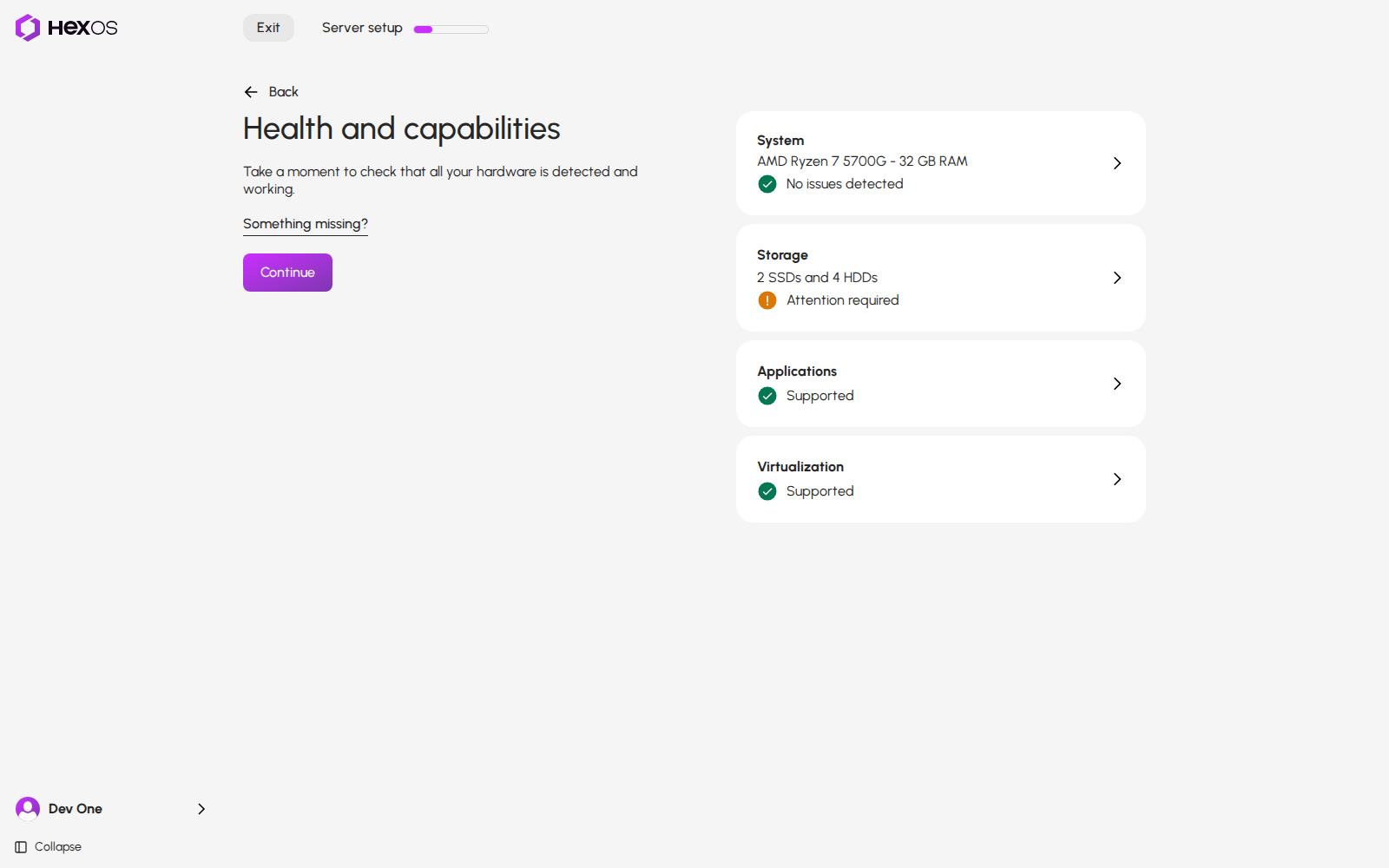
When you set up a new server, the Health and capabilities screen looks at your hardware before anything touches your drives. Four cards, System, Storage, Applications and Virtualization, each give you a one-line verdict, and every card that asks for your attention tells you exactly why when you open it. No more amber warnings with nothing behind them.
If you share hardware data, this is also where the Hardware Advisor speaks up first: if your network card, storage controller or drives are known to cause trouble with TrueNAS, you find out before you put your family photos on them, not after.
¶ Run a full checkup any time
After setup, open Settings > Health & Capabilities and click Run diagnostics. In about a minute, HexOS checks more than twenty parts of your server and tells you what needs your attention:
- Storage: your pools, boot drive, drive health (SMART), drive errors, drive temperatures, storage errors in the system log, your health check schedule and system drive space
- Memory: memory status, out-of-memory events and your last memory test
- Apps: the apps service, install and update errors, the download connection and your Docker Hub download limit
- Network and system: network ports, router DNS protection, the system clock, your TrueNAS version, TrueNAS alerts and failed jobs
- HexOS: your Buddy Backups and your connection to HexOS
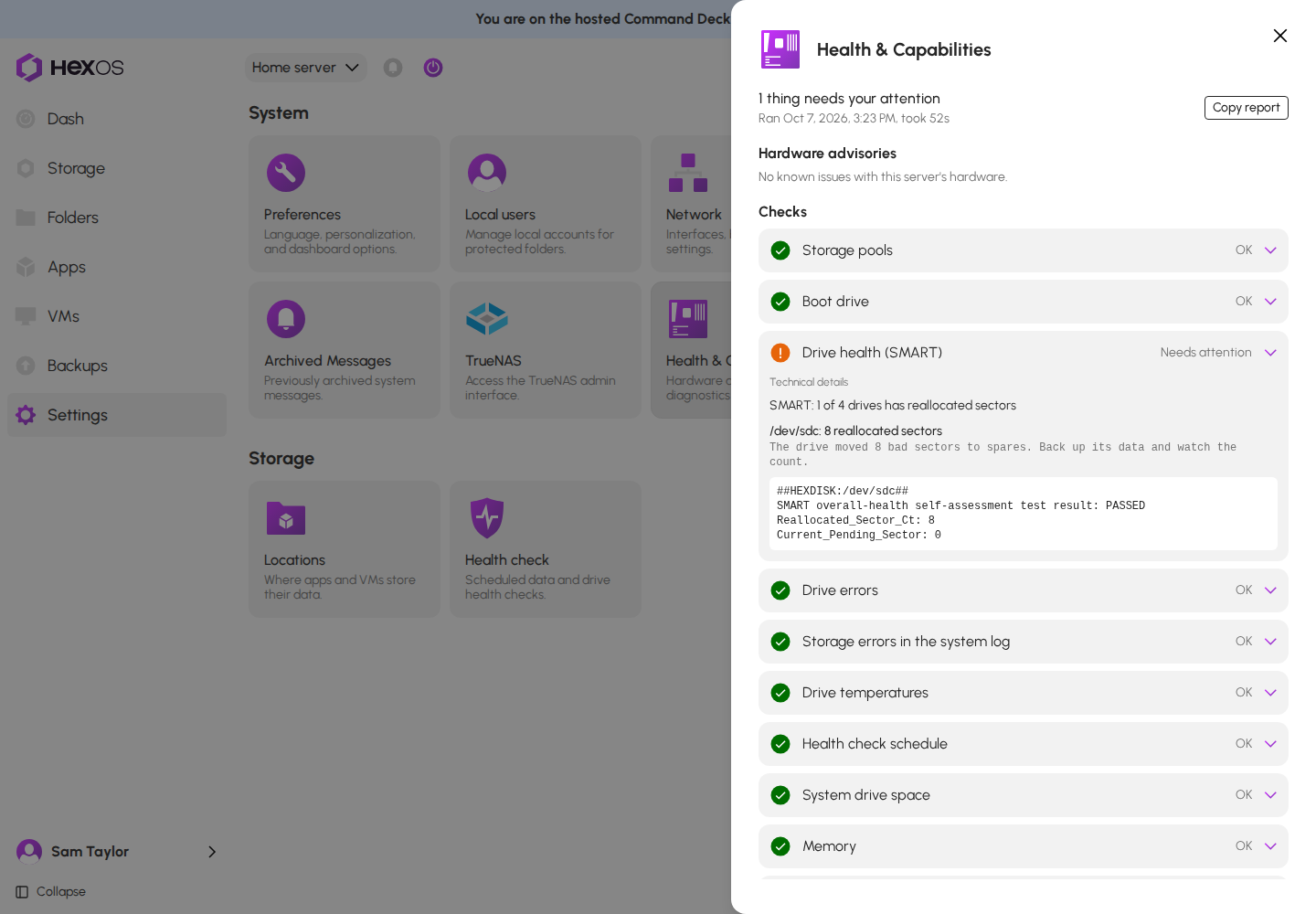
Each check comes back as OK, Needs attention, Note, Couldn't check or Skipped, and you can open any one of them to see what it found. Diagnostics runs on your server itself, so it works whether or not you share hardware data.
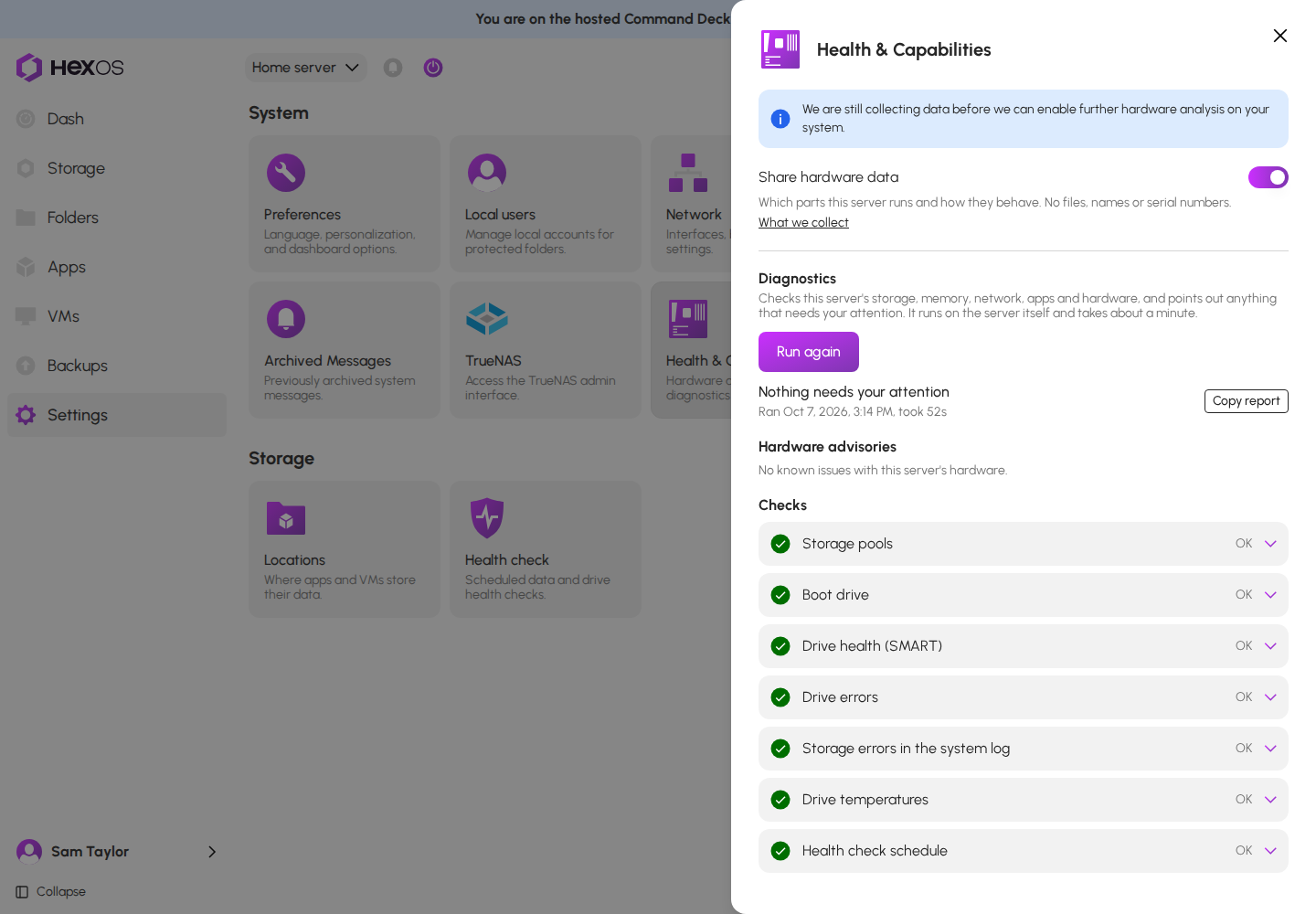
When you need help, click Copy report and email it to support. Instead of a back-and-forth about what hardware you have and what TrueNAS version you're on, support gets the whole picture in one message.
¶ Know about bad hardware before it bites
With hardware data sharing on, your diagnostics report includes Hardware advisories: known problems with parts like the ones in your server, matched against the exact part, its revision and your TrueNAS version. That precision matters. Two network cards with the same name can behave completely differently depending on the chip revision inside, so a simple "this brand is bad" list would warn people with perfectly good hardware and miss people with the broken kind.
A few examples of what the Advisor knows about today:
- Network cards with known driver problems on TrueNAS, including certain Realtek and early Intel 2.5 GbE chips that drop their connection under load
- AMD Ryzen idle freezes, where certain Ryzen processors can lock up when the server sits idle, and the BIOS setting that fixes it
- USB network adapters and drive docks that aren't suited to a server running around the clock
- SSDs that aren't recommended for storing pool data, such as QLC and DRAM-less models
- Storage controllers with a known risk to your data
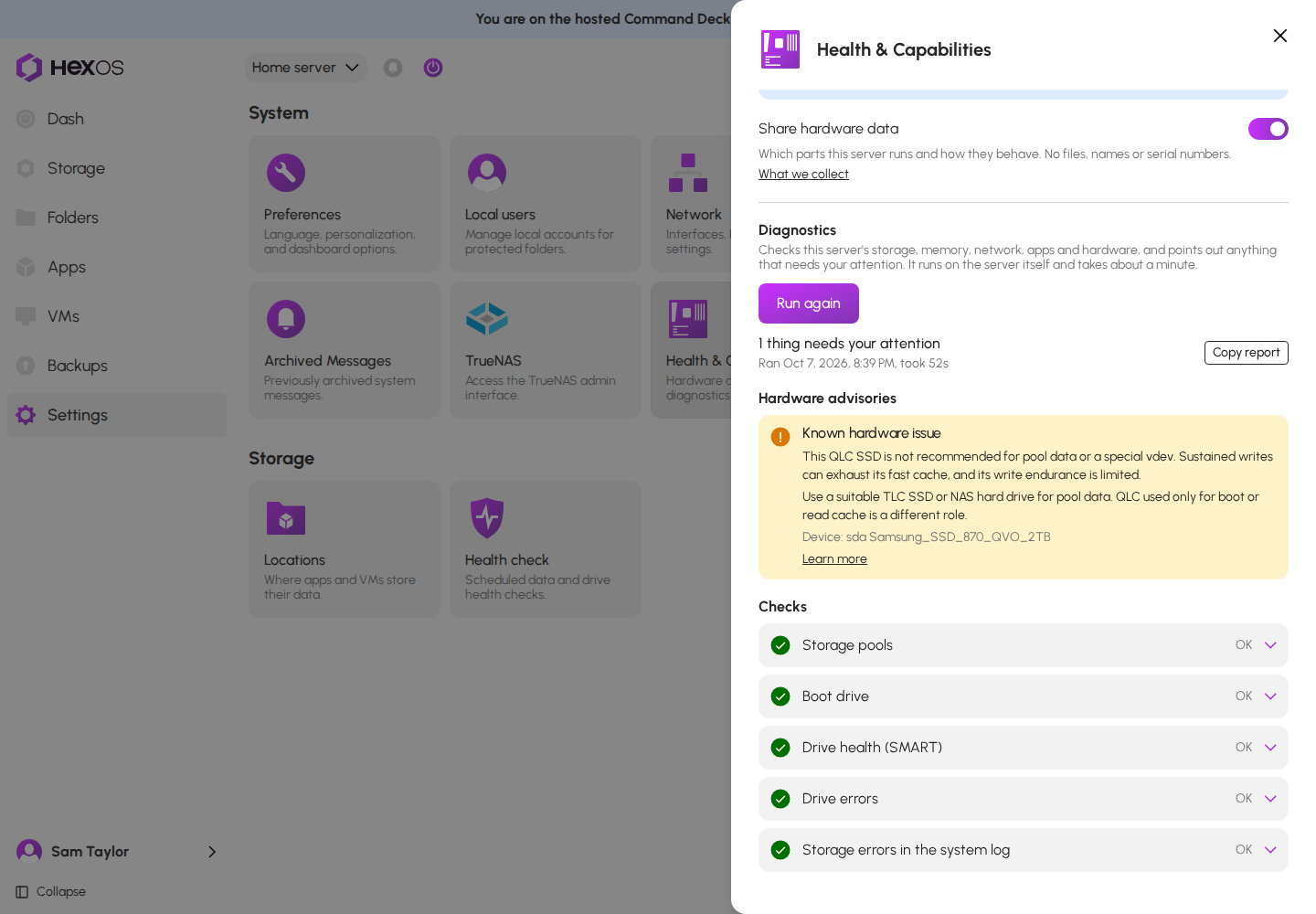
Each advisory says what the problem is, what to do about it, and links to a guide that explains the part and names known-good alternatives. And when your server has actually logged the trouble an advisory describes (connection drops, drive timeouts, unexpected restarts), the report says so, so you can tell the difference between "this part can cause problems" and "this part is causing problems."
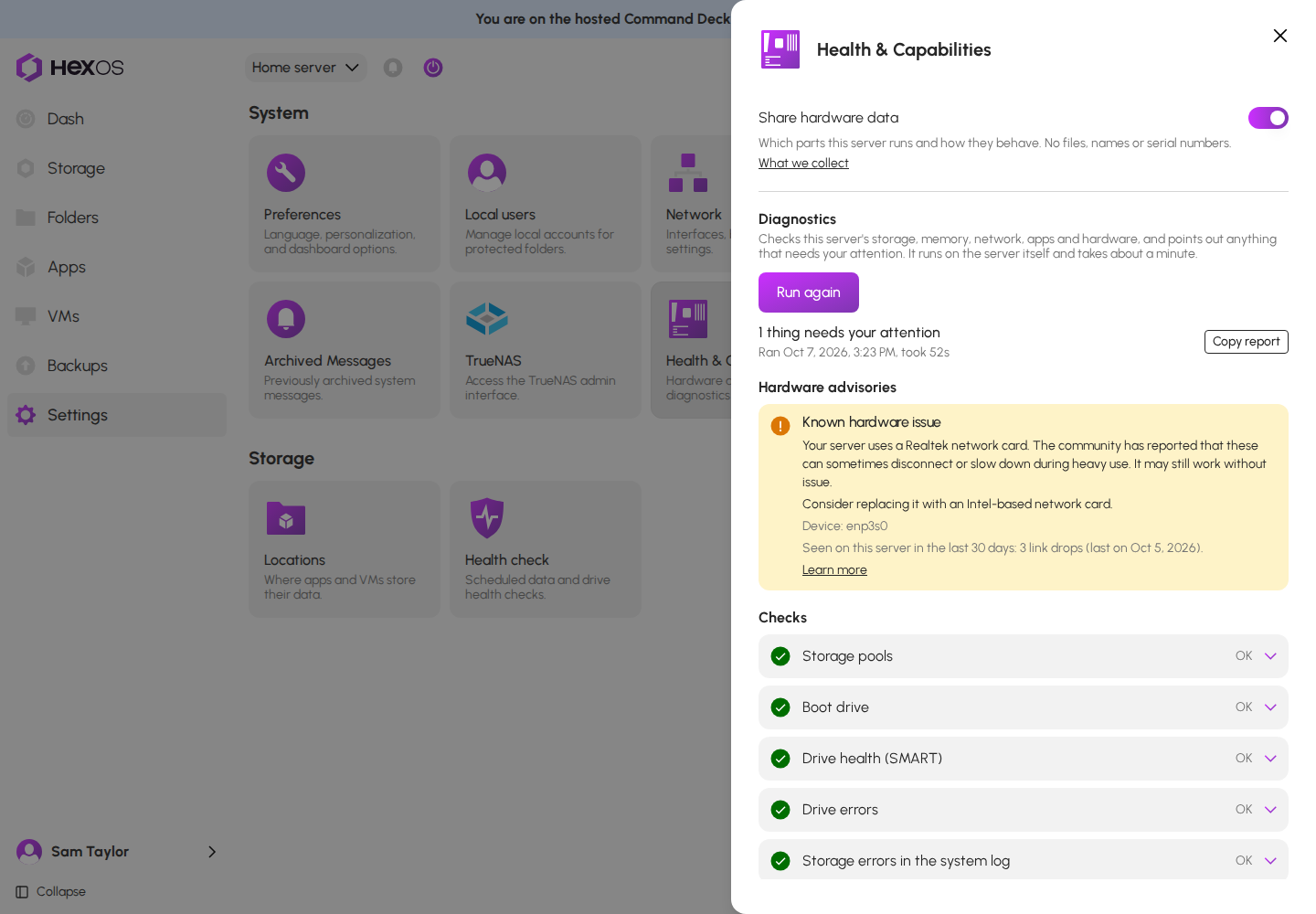
Every advisory is reviewed by a person on our team before it reaches you, and each one has to cite a source we can check.
¶ Why we're asking you to share
Here's the honest part: a list of known problems is only as good as the evidence behind it. Today, the Advisor's knowledge comes from TrueNAS documentation, bug reports and the community. That's a good start, but it has two weaknesses.
First, it's mostly built from complaints. People post when hardware breaks, not when it runs flawlessly for a year, so the community record makes some parts look worse than they really are.
Second, it can't tell you anything about hardware nobody has written about yet.
The fix for both is real-world data from real HexOS servers. So the first time you open your Command Deck after this update, you'll see a window called Meet the Hardware Advisor. It asks one question: may HexOS monitor this server's hardware?
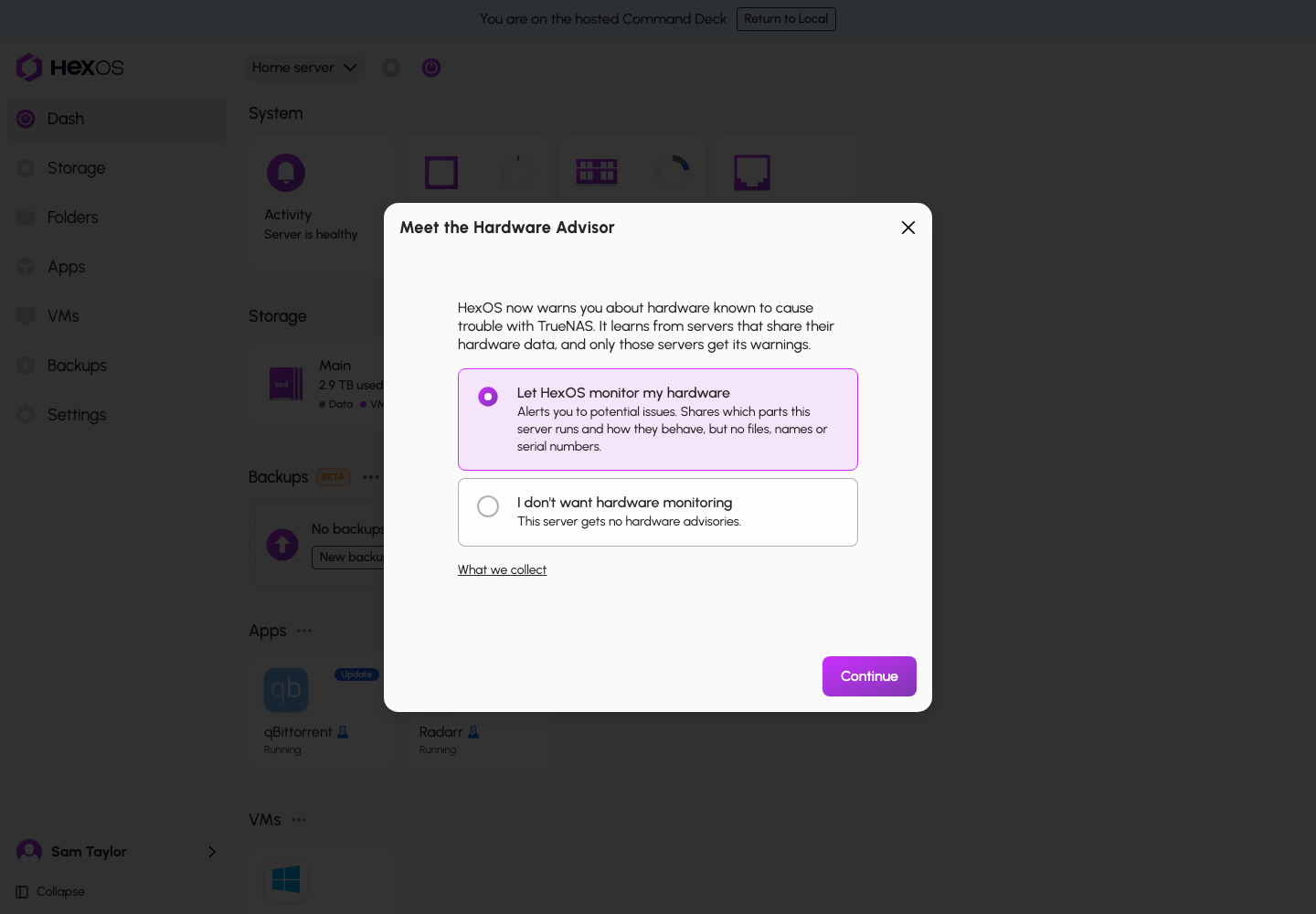
If you say yes, your server sends HexOS a short report once a day, at night. It lists the parts in your server (motherboard, BIOS version, processor, network cards, storage and graphics controllers, and any USB drive enclosures) and counts signs of trouble: connections dropping, drive errors and timeouts, a drive that disappears, or a restart that HexOS didn't start.
What it never sends: your files or anything in them, the names of your folders, shares, apps or users, passwords or keys, drive serial numbers, network hardware (MAC) addresses, your motherboard's serial number, or lines from your system log. Drives and network ports are identified by private codes your server generates, and HexOS cannot turn those codes back into serial numbers.
We want to be straightforward with you: reports are not anonymous. Each one is linked to the server that sent it, because that's what lets us count a part once per server and match it back to you when an advisory applies. The full list of what is and isn't sent lives in our What we collect documentation.
If you say no, your server never sends a hardware report. Diagnostics still works. The trade is that your server won't receive hardware advisories, since the advisories are built from what sharing servers contribute.
The choice is per server, it's yours, and you can change it at any time in Settings > Health & Capabilities. If you turn sharing off, your server stops reporting immediately, and nothing from the time sharing was off is ever sent later. If you want the data we already received deleted, email [email protected] and we'll take care of it. And if you ever sell or give away your server, the choice resets: the next owner is asked fresh.
¶ The next 90 days: from a list of complaints to a hardware knowledge base
If you open Health & Capabilities today, you'll see a notice at the top: We are still collecting data before we can enable further hardware analysis on your system. That notice is the most exciting part of this update.
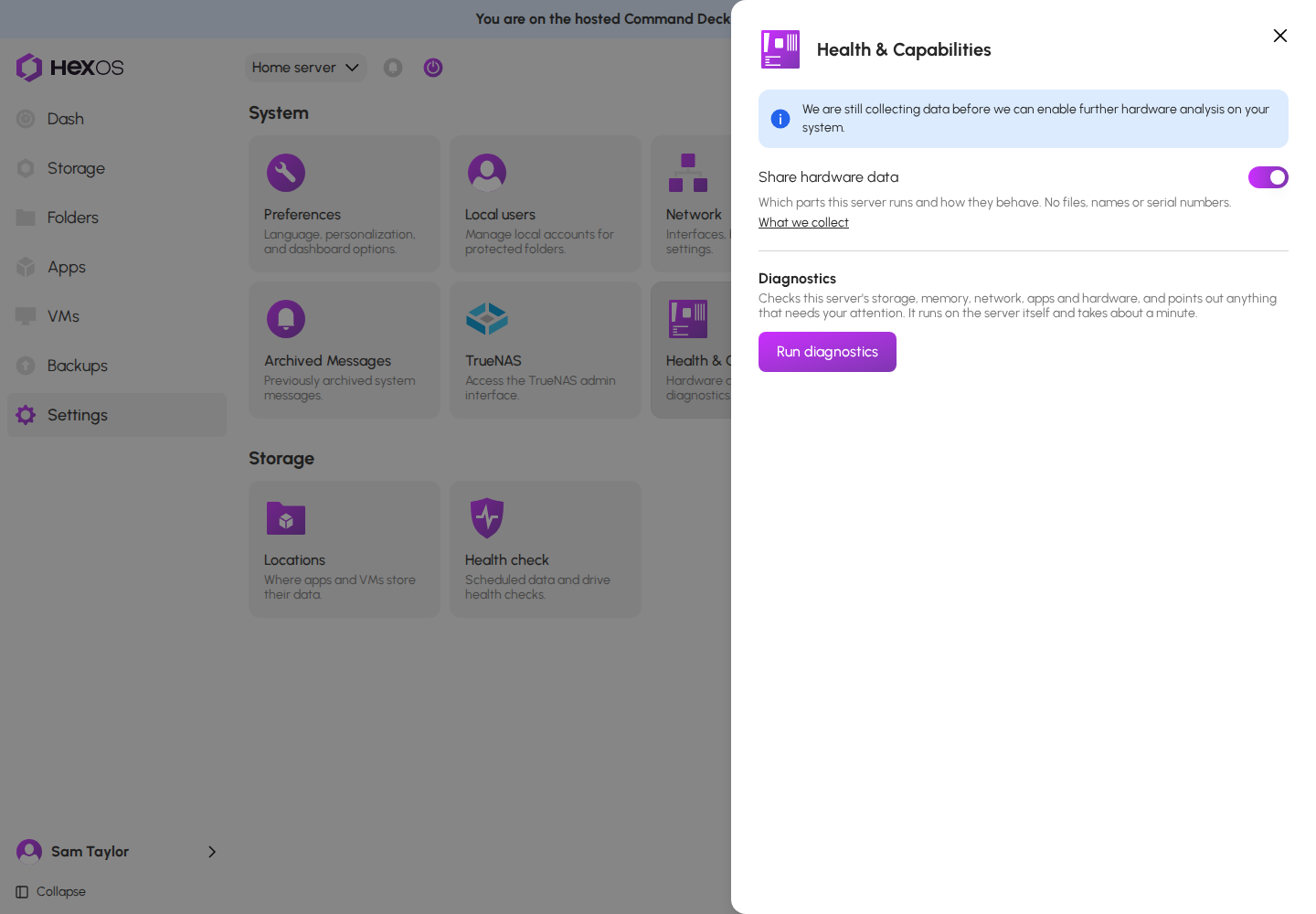
Over the next 90 days, every server that shares its hardware data adds to a picture no single forum thread could ever give us: which parts HexOS owners actually run, for how long, and how they actually behave. Ninety days isn't arbitrary. It's how long a part has to run trouble-free across a large number of servers before we'll trust the data enough to act on it. Once that seed period is over, here is what the Advisor will be able to do for you:
See how your hardware really performs. For each part in your server, Health & Capabilities will show how many HexOS servers run that same part and how often it runs into trouble. Instead of guessing whether your network card is one of the "bad" ones, you'll see how it's doing across real servers like yours.
Fewer false alarms. When enough servers run a flagged part without a problem, that evidence is used to clear the warning for that exact part and revision. Hardware that the internet has unfairly maligned gets a fair hearing, and you stop being warned about parts that are proven fine. We're deliberately strict here: a part has to run clean on hundreds of servers for months before its warning comes off, and for drives we wait years, because a warning that's wrong in the other direction can cost you data.
Catch problems nobody has written about. Patterns that would never surface in a forum (a particular controller and board combination that restarts unexpectedly, a drive model that fails young) show up when you can see across thousands of servers. Those patterns are how new advisories will be found.
Warnings where you'll see them. Today, advisories appear in your setup screen and diagnostics report. Once the data is in, they'll also appear right on your dashboard: the affected processor, network interface or storage pool will be highlighted, with a link to what to do about it.
Shop with confidence. Further out, we plan to open the hardware database itself on our website, so anyone planning a build can browse the most common and best-supported parts across the HexOS community before they buy.
Every one of these depends on the data the next 90 days produce. The more servers that share, the faster each part reaches the point where we can say something trustworthy about it, and the more useful the Advisor becomes for everyone, including you.
¶ Get started
There's nothing to install. Open your Command Deck and:
- When the Meet the Hardware Advisor window appears, choose whether HexOS may monitor your hardware and click Continue.
- Open Settings > Health & Capabilities and click Run diagnostics to see how your server is doing today.
If you have more than one server, you'll be asked once for each. For the full details, read the Health & Capabilities documentation.
Thank you to everyone who opts in. Every server that shares makes HexOS a little smarter for the next person setting one up, and we can't wait to show you what the Advisor can do in 90 days.
The HexOS Team