¶ Plex Media Server VM
Info: Virtual Machines is in beta. Everyone can use it. Beta means we are still finishing it, so screens may change and you may find a rough edge. Read the known issues at the end of this page. What beta means
Plex Media Server is in the VM catalog under Appliances. HexOS sets up a small VM that runs Plex and reads the media in your HexOS folders. You do not need to install anything inside the VM.
¶ What it can read
The VM reads six of your HexOS folders: Media, Movies, Shows, Music, Photos and Videos. It can read them but cannot change or delete anything in them.
To do this, HexOS creates an account on your server just for this VM, named plexvm (or plexvm2 and so on, if that name is taken). Its password is stored only inside the VM. The account is not listed with your users, and HexOS removes it when you uninstall the VM.
The VM reads the folders over your network, the same way a computer in your home does. On some servers, a newly installed Plex VM gets the folders directly instead. See Direct folder access.
Requirement: Each of the six folders needs a share that is turned on and unlocked. If one does not, the install stops and says which folder to fix, for example A default media folder has no share HexOS could confirm. Check the folder's share under Folders and install again.
¶ Set it up
- Go to VMs, open Browse categories > Appliances, and click Plex Media Server.
- Click Install.
- VM details: keep the name or type your own.
- Setup: turn on Sign in to Plex if you want HexOS to claim the server on your Plex account and create your libraries. Leave it off to do that yourself. See VM setup.
- Continue through Storage, Resources and Peripherals.
- On Review, read the Shared folders card. It lists the folders the VM gets read-only access to.
- Click Create VM.
The Shared folders card on the Review step
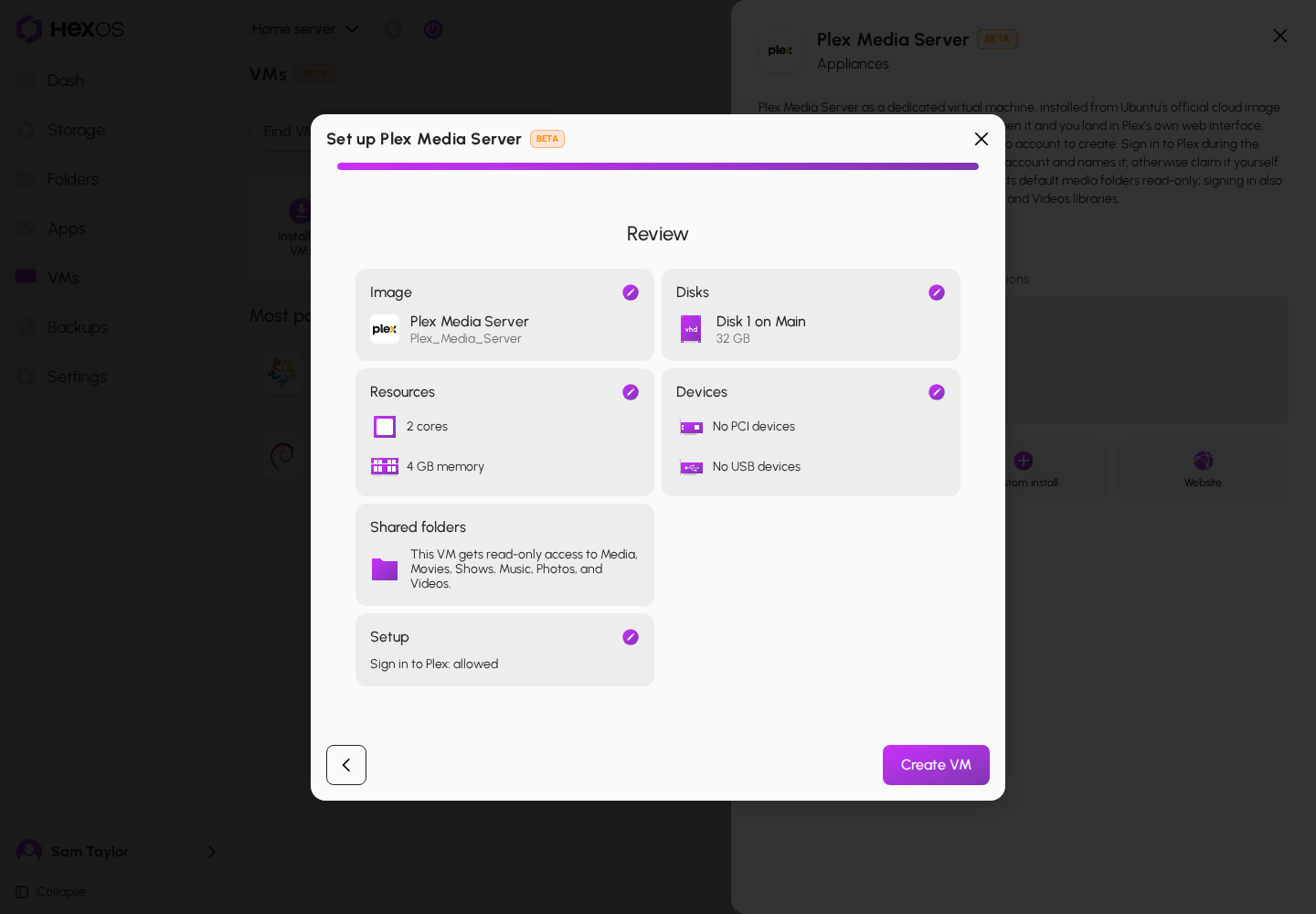
There is no Account step: the VM signs in to your folders with its own account.
¶ Open Plex
When setup is done, go to VMs > Installed VMs, click the VM, and click Connect. It opens Plex's web page. Console is only offered with Expert Mode on.
If you left Sign in to Plex off, Plex's own setup page asks you to sign in and claim the server, and to add your libraries.
¶ The media folders row
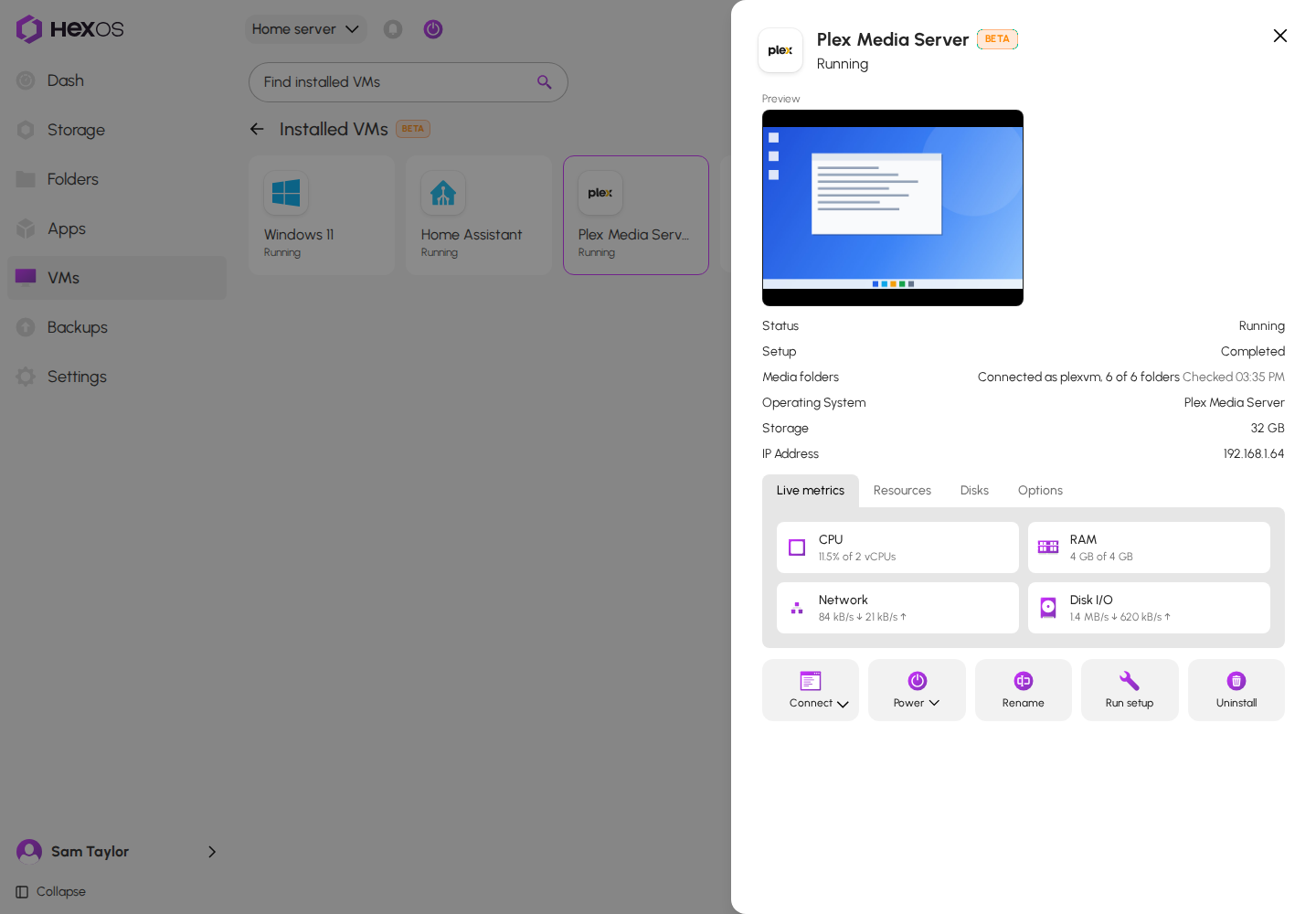
While the VM is running, its details show a Media folders row. A VM with direct folder access has no Media folders row. HexOS checks it about once a minute while the details are open:
- Connected as plexvm, 6 of 6 folders: everything is fine.
- Not connected: followed by folder names: the VM cannot reach those folders right now.
- Share disabled: followed by folder names: the share for that folder is turned off.
- The VM has no address yet or The VM's address could not be verified: HexOS cannot check yet.
- Could not check the folders: the check itself failed. It runs again a minute later.
Under the row, Checked and a time says when it last looked.
The Media folders row
¶ Scans after a folder comes back
Plex cannot see changes in network folders by itself. When HexOS signed in to Plex for you, it set your libraries to be scanned every hour.
When a folder comes back after an outage, HexOS asks Plex to scan that library again and shows Recovery started for and the folder name. HexOS notices this only while someone has the VM's details open. This needs Sign in to Plex to have worked during setup.
¶ Direct folder access
HexOS is turning on a faster way for the Plex VM to read your folders, a few servers at a time. With it, HexOS gives the six folders to the VM directly instead of over your network. Plex reads your media faster, and the VM no longer needs your server's network address to reach the folders.
This applies only to a Plex VM installed while direct folder access is on for your server, on TrueNAS 25.04.2.6 or later. A Plex VM you already have keeps reading its folders over your network. To move it over, uninstall it and install it again.
The VM still reads the same six folders and cannot change anything in them, and HexOS still creates the plexvm account for it. These things are different:
- Start it from HexOS. HexOS connects the folders before it starts the VM, so a start from TrueNAS fails. When your server restarts, TrueNAS tries to start the VM first and logs that it failed. HexOS starts the VM a little later, once HexOS is running again, so you do not need to do anything.
- A running VM keeps its folders in use. While it runs, you cannot lock or delete any of its six folders, or delete their pool. HexOS says Folder in use by a virtual machine (or Pool in use by a virtual machine). When you turn on encryption for one of them, HexOS lists the VM as using the folder. Stop the VM first, then start it again when you are done.
- A locked folder keeps the VM off. If one of the six folders is locked, HexOS does not start the VM and says One of this virtual machine's folders is locked. Unlock it, then start the virtual machine again. If the folder was locked when your server restarted, HexOS starts the VM as soon as you unlock the folder. Otherwise, click Power on after you unlock it.
- Folder access stopped. If the VM loses its connection to a folder while it runs, its card shows Folder access stopped and its details say what to do. Anything inside the VM that reads that folder is stuck until the VM restarts. Stop the VM and start it again, or use Reboot. HexOS checks every few minutes, so the message can take up to six minutes to appear.
- Restoring an apps backup. If a restore writes into a folder the VM reads, HexOS leaves the VM off and says the VM "reads folders the restore wrote into. It was not started and won't start by itself. Check it, then start it."
If HexOS cannot connect the folders for another reason, it says Folders couldn't be connected and what to do, for example One of this virtual machine's folders no longer exists. Check its folders, then try again.
¶ Remove it
Uninstall removes the VM, the plexvm account, and the Plex token HexOS kept. Its disk is deleted only if it is ticked. Your media folders and the files in them are not touched. See Uninstall.
¶ Known issues
- The Plex Media Server page does not say which folders it can read. Its Locations and Permissions tabs do not list the six media folders. Only the Review step does. Meanwhile, read the Review step before you click Create VM.
- Run setup can do nothing. If Sign in to Plex was off when you installed the VM, Run setup says There is nothing to set up for this VM., and you cannot turn the sign-in on later. Meanwhile, claim the server from Plex's own setup page, or uninstall the VM and set it up again with Sign in to Plex on.
- Retry on the media scan row always fails. Meanwhile, do not click Retry on a failed Scan libraries after a media folder reconnects row. Start a library scan inside Plex instead.
For the full list, see Known issues.