¶ Network cards with known issues
HexOS checks the network card in your server against a list of parts that are known to cause problems with TrueNAS. HexOS runs on top of TrueNAS. To see the result, your server must share hardware data with HexOS. Open Settings > Health & Capabilities and click Run diagnostics. When your card is on that list, the report shows it under Hardware advisories, with what the problem is and what to do about it. If your server has not logged that problem, the entry is titled Known issue, not seen on this server. Click Learn more in the entry to open this page.
A network card warning in diagnostics
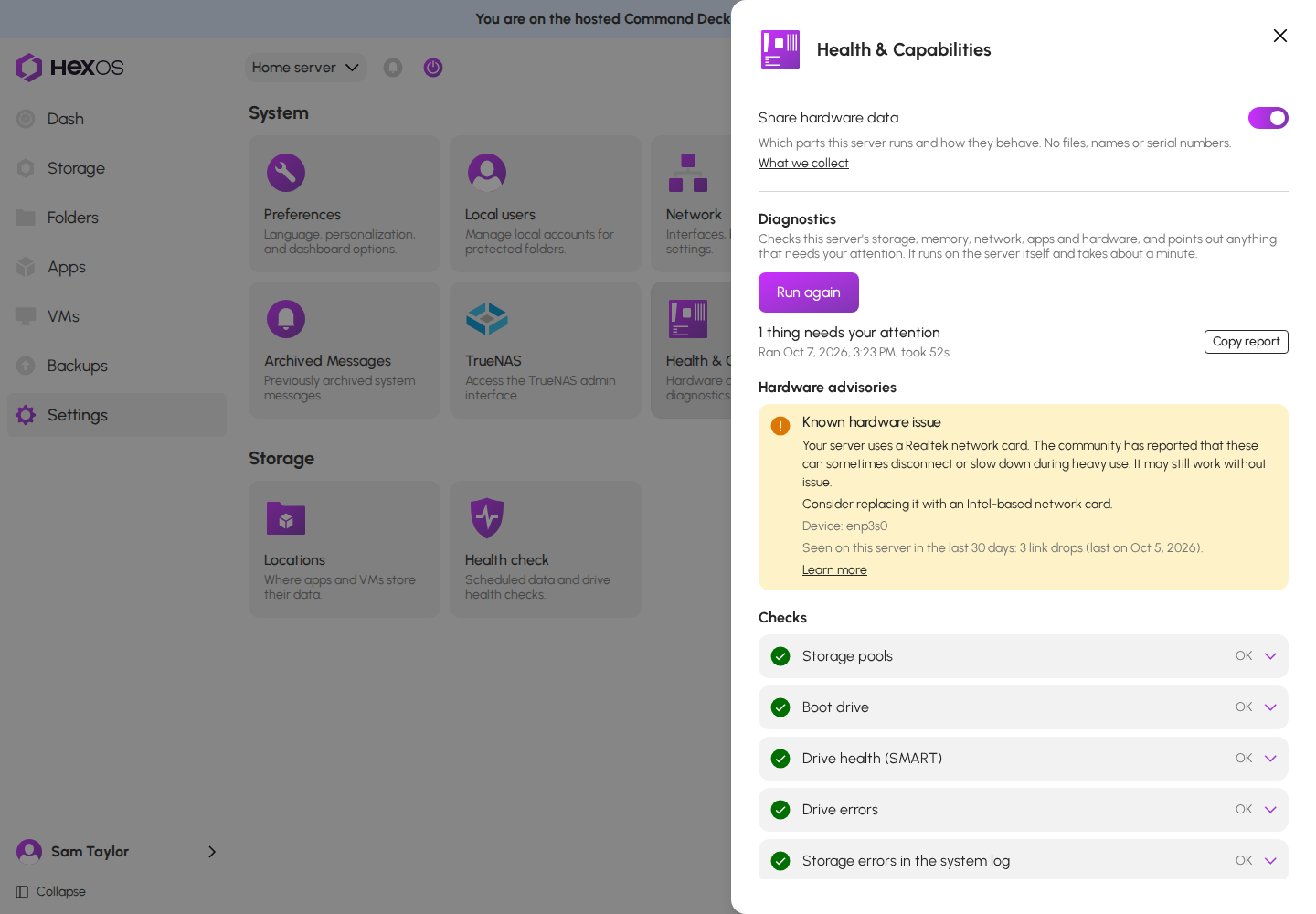
Info: Warnings on the dashboard are not shown for everyone yet. For now, the diagnostics report is where you see them. See Health & Capabilities.
This page explains each of those warnings. A warning does not mean your server is broken. Many people run these cards without trouble. It means that if you see the trouble described here, the card is the likely cause.
Info: After you replace the card, HexOS reads your server's parts again when the server starts, and the warning is gone the next time you run diagnostics. There is nothing to confirm.
¶ Realtek gigabit cards
Which cards: Realtek RTL8111, RTL8168 and RTL8411. These are the gigabit cards built into most consumer motherboards.
The problem: The community has reported that these cards can disconnect or slow down during heavy use, for example while a backup runs or a large folder copies. They may still work without issue. The problem shows up as transfers that stall or a server that loses its network connection for a moment and then reconnects.
The recommended fix: Consider replacing it with an Intel-based network card. See what to buy instead.
¶ Realtek RTL8125 and RTL8126 cards
Which cards: Realtek RTL8125, RTL8125A and RTL8125B (2.5 gigabit), and RTL8126 (5 gigabit). These are common on newer motherboards and on add-in 2.5 gigabit cards.
The problem: The community has reported that these cards can be unstable or slow on TrueNAS, with the connection dropping under load and speeds that are much lower in one direction than the other. They may still work without issue.
The recommended fix: Consider replacing it with an Intel I226-based network card. See what to buy instead.
Tip: The newer RTL8125D revision is a different case: it has no driver on TrueNAS versions before 26. See no driver on your TrueNAS version.
¶ Intel I225 early revisions
Which cards: Intel I225-V, revisions 1 and 2. Revision 3 and the newer I226-V fixed the problem and are not affected.
The problem: Early revisions of this chipset are known to drop their connection. Intel itself has confirmed this problem, not only community reports.
The recommended fix: If you see disconnects, consider replacing it with an Intel I226-based network card. If your connection is stable, there is nothing to do. See what to buy instead.
¶ No driver on your TrueNAS version
Which cards:
- Realtek RTL8125D (the newest 2.5 gigabit revision) on TrueNAS versions before 26
- Realtek RTL8126 (5 gigabit) on TrueNAS versions before 25.04
- Tehuti TN4010 and TN9710 (10 gigabit) on TrueNAS versions before 25
The problem: Your TrueNAS version has no driver for this card, so the port cannot be used at all. The card is not faulty. The software to run it arrived in a later TrueNAS release.
The recommended fix: Update TrueNAS to a version that has the driver, or replace the card with an Intel-based one. See what to buy instead.
Requirement: Your server needs a working network connection to update. If the affected card is the only one in the server, connect a supported card first, or use a USB network adapter for the update only.
¶ Drivers no longer maintained
Which cards: Mellanox ConnectX-2 (10 gigabit) and Tehuti TN4010 and TN9710 (10 gigabit) on TrueNAS 25 and later.
The problem: The driver for these cards is no longer maintained on current TrueNAS versions. The card may work today and stop working after an update.
The recommended fix: Consider replacing it with an Intel-based network card before your next update. See what to buy instead.
¶ What to buy instead
TrueNAS documentation names Intel and Chelsio network cards as the best-supported options. Intel cards are the common choice for a home server because their drivers are built into TrueNAS and need no extra setup.
| Speed | Look for | Notes |
|---|---|---|
| 1 gigabit | Intel I210 or I350 (for example the I350-T2 dual-port card) | Uses the igb driver, built into TrueNAS |
| 2.5 gigabit | Intel I226-V | Uses the igc driver, built into TrueNAS. Choose I226 over I225 |
| 10 gigabit | Intel X520, X550 or X710 (for example the X710-DA2 SFP+ card), or Chelsio T520 | Built-in drivers. SFP+ cards need a matching module or direct-attach cable |
Before you buy, check that the card fits a free slot in your server. A 1 or 2.5 gigabit card needs one PCIe lane; a 10 gigabit card usually needs a slot with four or more lanes.
Help: Not sure which card to pick? Ask in the HexOS Discord Community with your motherboard model and the speed you need.
¶ After you change the card
- Shut the server down from the HexOS power menu and install the new card.
- Start the server. HexOS reads the parts again, and the warning is gone the next time you run diagnostics.
- If the server does not reconnect to the network, the new card may have a different name. Follow Connection issues to find it.