¶ Host a buddy's backup
Info: Buddy Backups is in beta. Everyone can use it, and every backup it makes is a real copy you can restore. Beta means we are still finishing it, so screens may change and you may find a rough edge. Keep any backup you already rely on running alongside it. What beta means
Hosting a backup means lending part of your pool to a friend. Their folders arrive encrypted, use only the space you agree to, and give them no way into your server.
¶ What you are agreeing to
You lend space. You choose how much. HexOS sets that space aside on the pool you pick. Their backup cannot grow past it, and your own files cannot take it.
You cannot read their data. Only encrypted folders can be sent to another person. The copies stay encrypted on your pool. On your side, their backup's page shows a note that only they can view their backup data, instead of a list of folders.
They cannot reach your server. Hosting gives your buddy no access to your files, folder names or Command Deck. The link between the two servers carries backup traffic only, and their server sees only the backup it sends.
You share your internet. Backup traffic uses your internet connection. You can limit how fast it runs.
You can remove it. It is your disk. Remove connection deletes everything they stored with you, and they get a notice.
¶ Find the request
HexOS does not email you about requests. When a buddy sends one, you see it in three places:
- A dot on Backups in the sidebar
- An item in your activity center
- Requests on the Backups page
- In the sidebar, click Backups.
- Click Requests. It shows how many requests are open, sent and received.
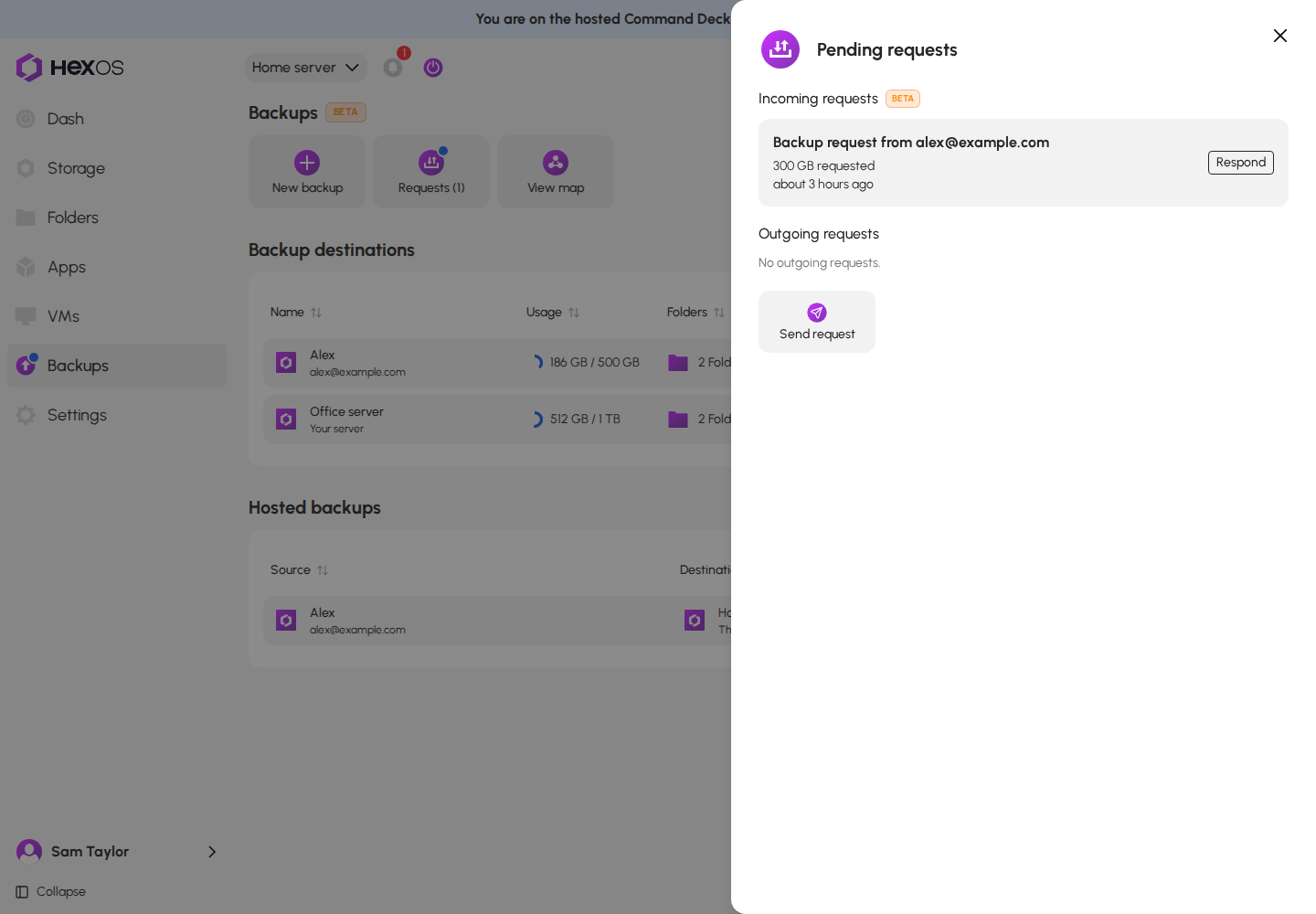
- The Pending requests page lists them under Incoming requests, with the sender's email and the space they ask for.
The Pending requests page
¶ Accept a request
- Click Respond on the request.
- The Backup request dialog opens on a summary. It shows who it is from and a card for each choice: Buddy, Storage, Retention, Location, and Transfer speed.
- To change a card (all but Retention), click its Edit button, make the change, then click Continue to go back to the summary.
- Click Accept.
The Backup request summary
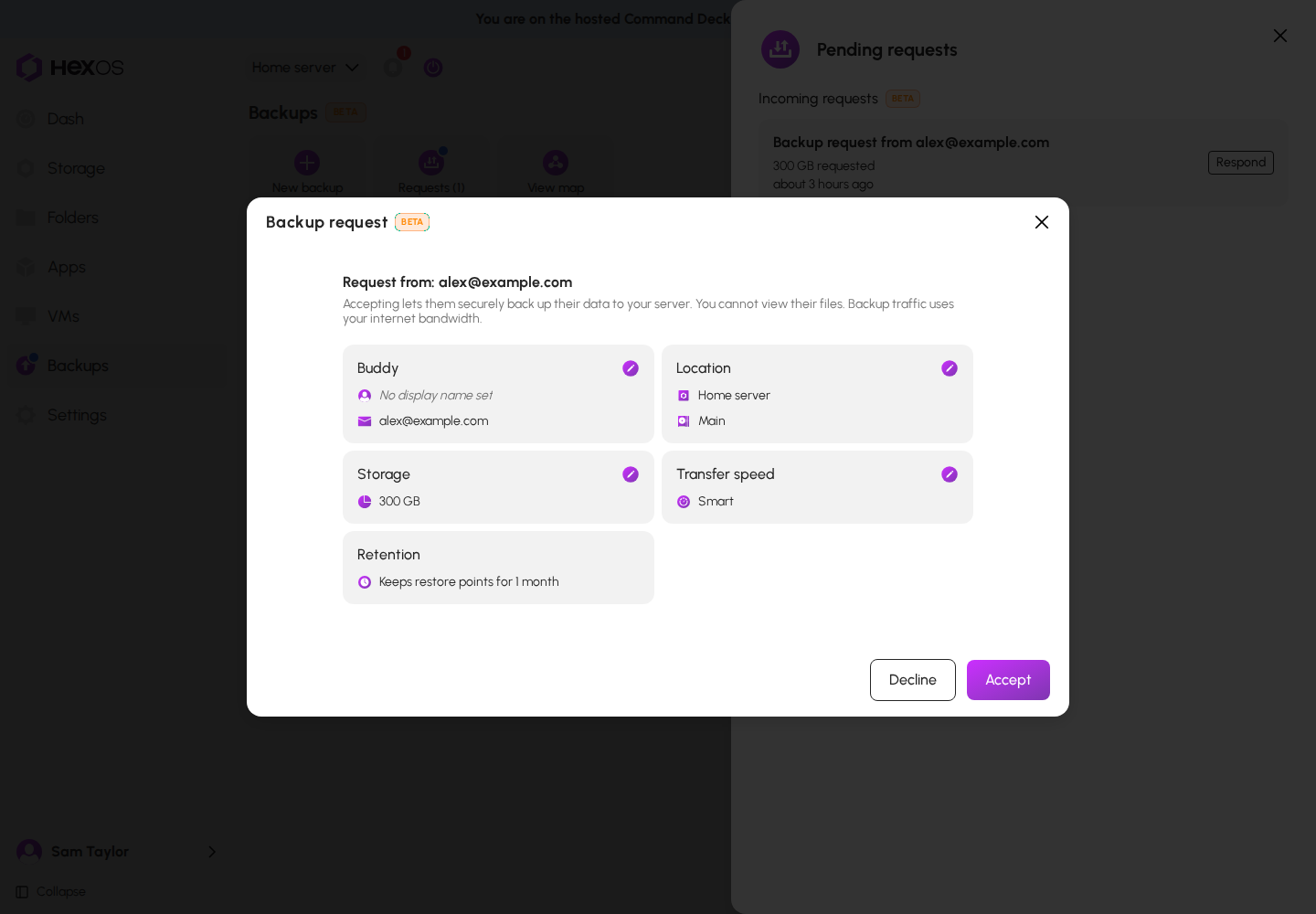
What each card is for:
- Buddy: a name for your buddy under Display name (optional). Only you see it.
- Storage: the space your buddy asked for. To offer a different amount, check Allocate a different amount and enter it. It cannot be more than the free space on the pool.
- Retention: how long your buddy chose to keep restore points.
- Location: the Server and Pool that store the backup. Only online servers are listed.
- Transfer speed: the limit for your side. Smart is chosen to start with. Transfers run at the lower of your limit and your buddy's.
Accepting sets the space aside on your pool and sets up the connection. Your buddy gets a notice that you accepted. If your buddy chose folders, their first backup starts as soon as setup finishes. A large first backup can take hours. After that, each backup sends only what changed.
Tip: Backups are stored compressed, so your buddy often uses less space than they asked for. See Compression.
¶ Decline a request
Click Respond, then Decline in the summary. Nothing is stored and nothing is deleted, because nothing was copied.
Your buddy can also withdraw a request before you answer. Either way, only the request goes away.
¶ After you accept
The backup shows in the Hosted backups table on the Backups page. Click it to open its page.
A backup you host
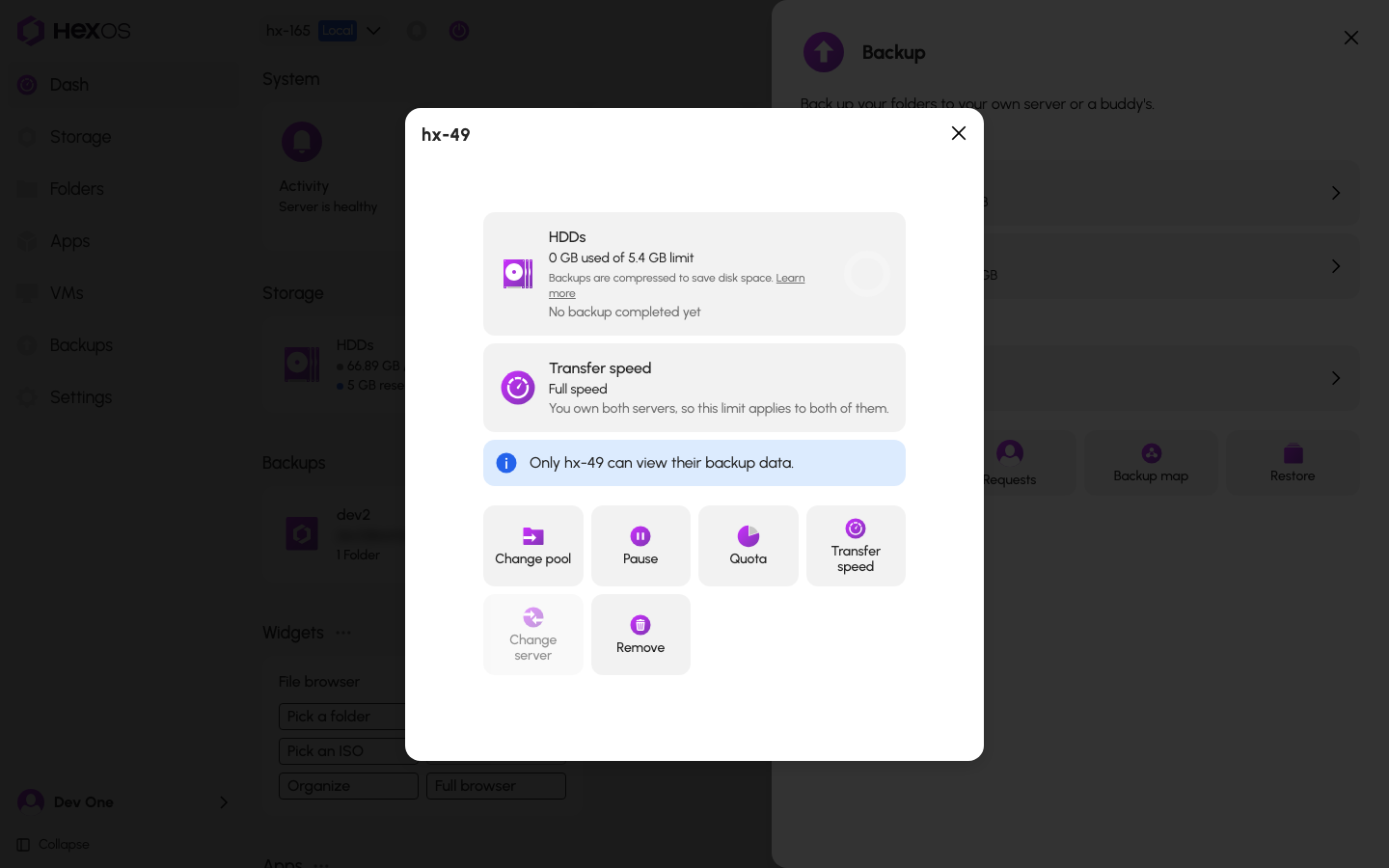
The first card is named after the pool that stores the backup. It shows the space used out of the space set aside, when the last backup arrived, and when the next one is due. The Transfer speed card shows your limit and your buddy's.
The tiles are:
- Change pool: move the backup to another pool on this server.
- Pause (or Resume): stop new backups arriving. Everything stored stays. Only you can resume a pause you made.
- Quota: change the space set aside. It cannot go below what is already used, or above the free space on the pool.
- Transfer speed: change your side's limit.
- Change server: move the backup to another of your servers.
- Rename: change the name you see for your buddy.
- Remove: delete the connection and everything stored in it.
You can also manage hosted backups from the Storage page. Open a pool to see Hosting backups for, with the space set aside for each backup and a menu with Move to other pool, Transfer speed, Storage reservation, and Remove connection. The pool's usage bar shows the space set aside as Reserved (backups).
¶ When your buddy asks for more space
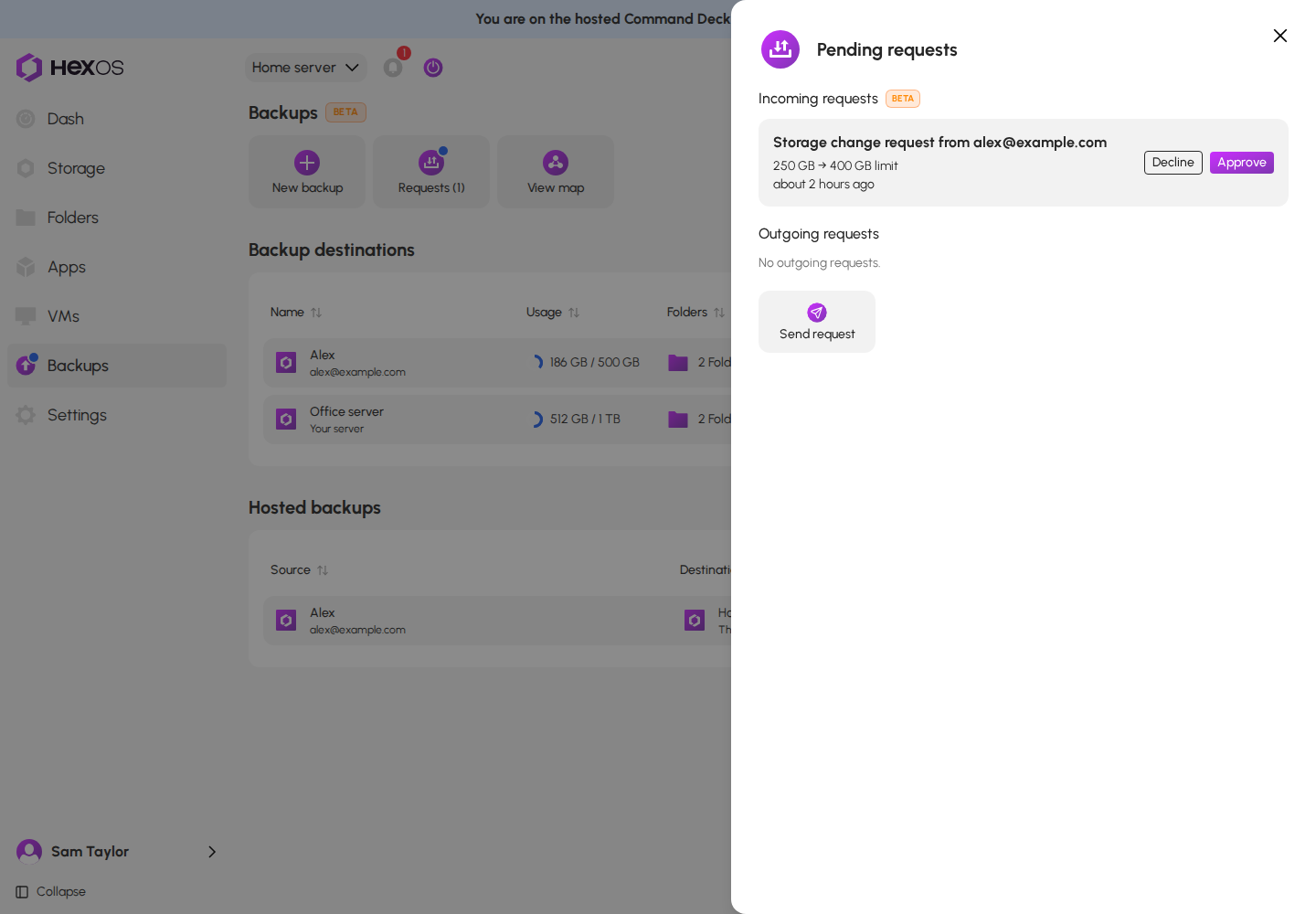
Your buddy can ask for more space. Their request shows on your Pending requests page as "Storage change request from" their email, with the old and new limit.
Click Approve to set aside the new amount, or Decline to keep the current one.
A storage change request
¶ Move a backup to another pool
- Click the Change pool tile.
- In Move backup to another pool, choose the Destination pool.
- Click Start move.
The Move backup to another pool dialog
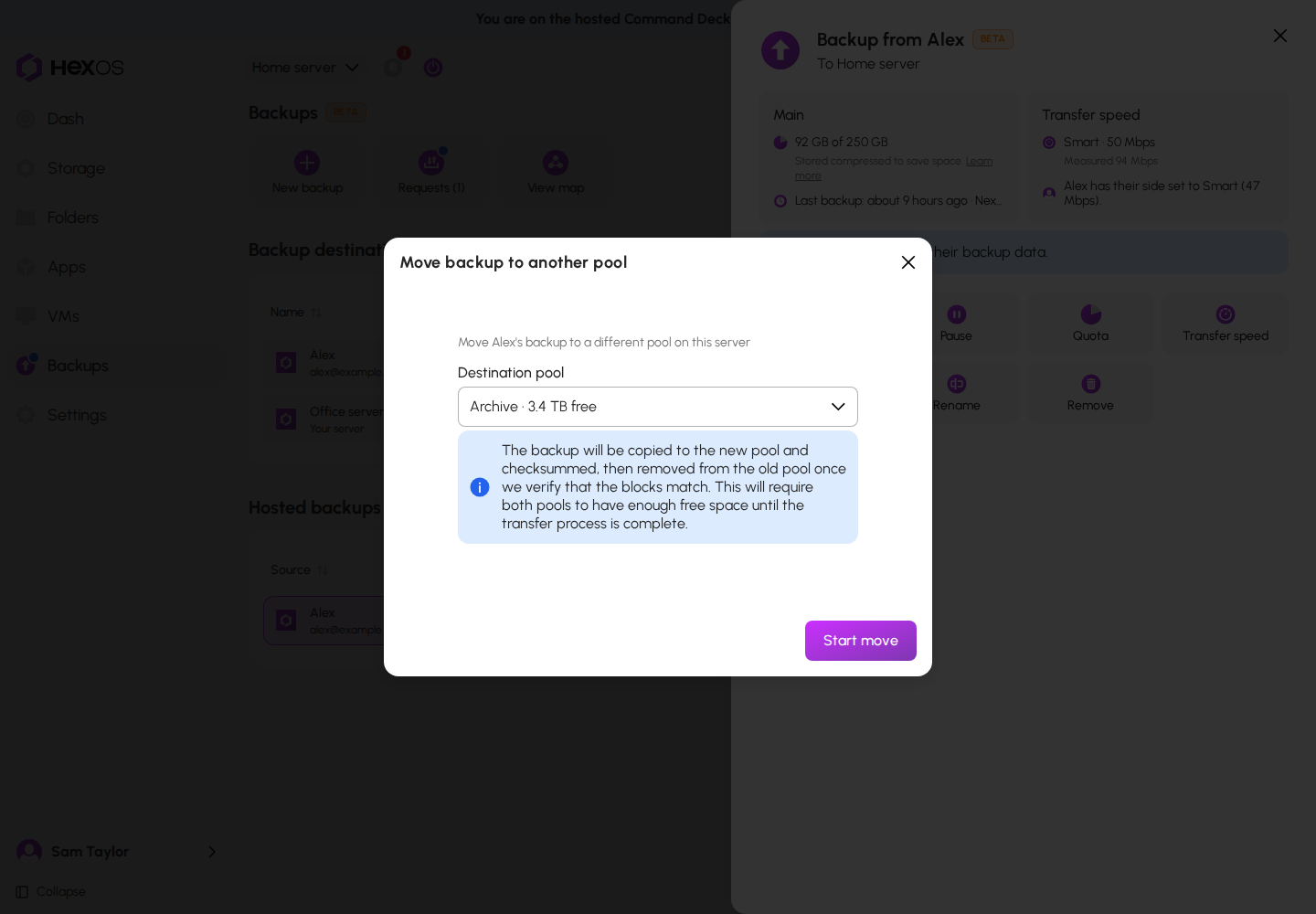
The backup is copied to the new pool and checked. It is removed from the old pool only after the copies match. Both pools need enough free space until the move finishes. Progress shows in the activity center.
You cannot move a backup while a backup or restore of it is running, or while it is paused. Wait for it to finish, or resume it first.
¶ Move a backup to another server
- Click the Change server tile.
- Choose the Server and the Destination pool.
- Click Move backup.
The Change server dialog
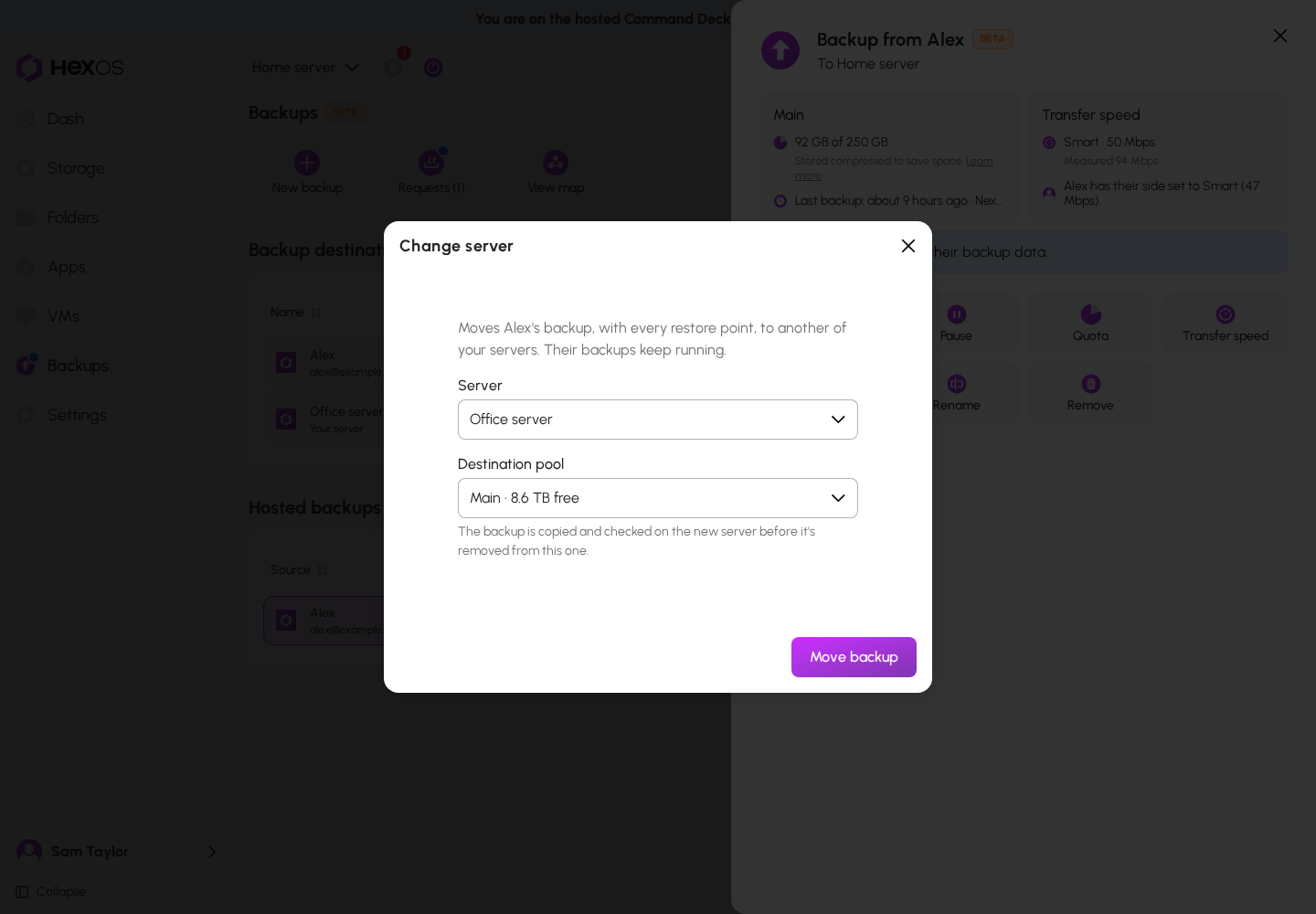
The backup moves with every restore point. It is copied and checked on the new server before it is removed from this one. Your buddy's backups keep running. Both of your servers, and your buddy's server, must be online.
After a normal move, HexOS checks every restore point on the new server, then deletes the old copy.
If part of the backup cannot be read because of drive errors, the move can stop. You can then click Move without the damaged copy, then Move backup in "Move without the damaged copy?". Your buddy's server sends those folders to the new server again, and your buddy is told.
After a move without the damaged copy, the old copy stays on the old server unless the fresh copy ends up with every restore point it had. HexOS tells you how many restore points only the old copy holds. When you no longer need them, click Delete old copy. In the dialog, check "I understand these restore points will be gone for good" and click Delete old copy again. Those restore points cannot be recovered afterwards.
¶ Pausing and removing
Danger: Remove connection permanently deletes your buddy's backup and every restore point in it. Their own files on their own server are not touched, but their offsite copy is gone. Either of you can do this. See Removing backups.
¶ Space notices
Every few hours, while your buddy's server is online, HexOS checks whether their next backup will fit. If it will not, you and your buddy both get a notice that says how much is needed. When HexOS is sure it cannot fit, it also pauses the backup for space instead of letting it fail. It resumes on its own when there is room. A backup can still stop if the space fills before the check runs; you both get a notice then too.
If your own pool is full, the notice says so, because more space set aside would not help until you free some.
When the space set aside is 90% used, you get the notice "Space you share with" your buddy "is nearly full". See Backup troubleshooting.
¶ Before you unclaim or reset your server
If your server stores backups for others, HexOS stops you before you unclaim or reset it in Settings. A dialog titled "Hosted backup deletion" lists whose backups would be deleted. To go ahead, you must check "I understand these hosted backups will be permanently deleted" and click Delete hosted backups. Each owner gets a notice on their own server.
Danger: Unclaiming or resetting a server that stores backups permanently deletes those backups. The unclaim dialog's "Pool data will not be affected" means your own files, not the backups you store for others.
Before you unclaim, reset, rebuild, or sell a server that stores backups:
- Tell your buddy first, so they can set up another destination.
- Open each hosted backup, click Remove, then Remove connection. This tells them.
- Then unclaim or reset the server.
Help: Not sure whether a backup is one you send or one you store? See Backup troubleshooting or ask in the HexOS Discord Community.