¶ Buddy Backups
Info: Buddy Backups is in beta. Everyone can use it, and every backup it makes is a real copy you can restore. Beta means we are still finishing it, so screens may change and you may find a rough edge. Keep any backup you already rely on running alongside it. What beta means
Buddy Backups keeps a copy of your most important folders on another server. That server can belong to a friend who also runs HexOS, or it can be a second server of your own. There is no monthly bill and nothing extra to install.
Folders you send to a buddy are encrypted. Your files sit on their server, but they cannot open them.
¶ What beta means
Buddy Backups is an open beta. It is on for everyone, with no sign-up. The Command Deck shows a Beta badge next to Backups. Click it to read a short note about the beta.
The Beta badge's note
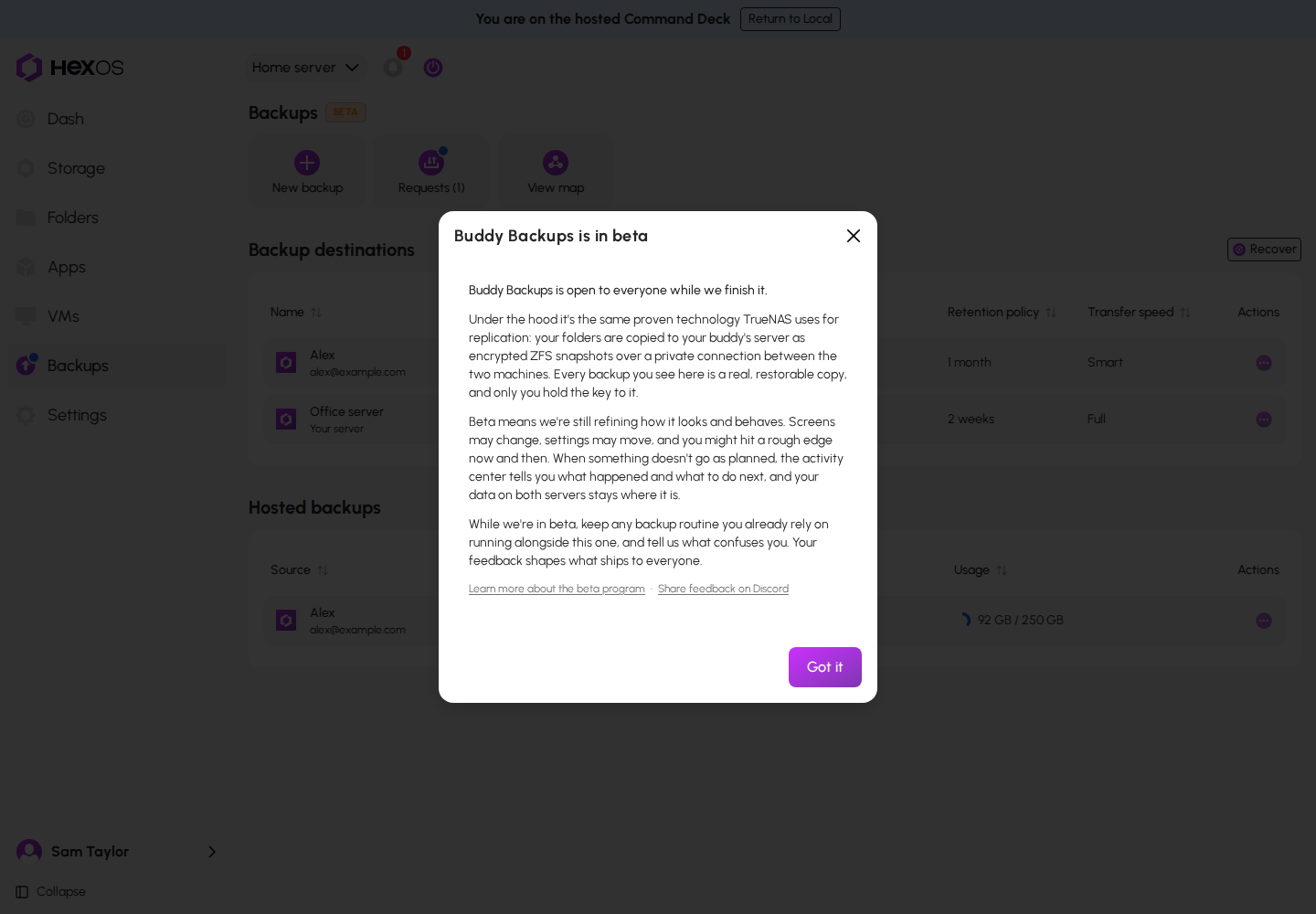
What this means for you:
- Your backups are real. Each backup is a full, restorable copy. It uses the same replication that TrueNAS itself uses.
- We are still finishing it. Screens may change, settings may move, and you may find a rough edge now and then.
- You are told when something goes wrong. The activity center says what happened and what to do next. Your data on both servers stays where it is.
- Keep your current backup. If you already have a backup you rely on, keep it running alongside Buddy Backups while it is in beta.
- Tell us what confuses you. Your feedback shapes the finished version. Share it in the HexOS Discord Community.
¶ Known issues
We know about these and are working on fixes. This list changes as fixes ship.
- Folders restored before restores asked who can open them are open to everyone on your network. Restores now ask, but a folder restored before then came back with no password. If you restored a folder before then, set who can open it. See Restore a folder.
¶ Why it exists
A pool with more than one drive protects you when one drive fails. It does not protect you from something that takes out the whole server:
- A fire, a flood, or a power surge
- Theft of the server
- Ransomware that encrypts every file the server can reach
The only protection against those is a copy in another building. Many people pay a cloud service for that. Buddy Backups uses spare space that you and your buddy already own instead.
¶ How it works
- You choose the folders to protect and where the copy goes: a buddy's server or another server you own.
- HexOS connects the two servers over a private, encrypted link. You do not need to change anything on your router.
- On the schedule you choose, your server saves a restore point of each folder and sends it. The first backup copies everything. After that, each backup sends only what changed.
- Each backup becomes a restore point on the other server. You can restore the newest one, or an older one from the time you chose to keep them.
- A folder sent to a buddy must be encrypted. It stays encrypted on their server, and they cannot open it.
Info: If HexOS manages your keys (the default), restored folders unlock on their own while you are signed in. If you chose to keep the recovery key yourself, HexOS asks for it once when you recover onto a new server. You can view your key in Settings > Recovery key. See Recovery keys.
If you want the technical details, see How Buddy Backups works.
¶ What you give and what you get
You give space on your server for your buddy's encrypted copy, and you keep your server running. You choose how much space. HexOS sets that space aside on your pool, so their backup cannot grow past it and your own files cannot take it.
You get the same in return: an offsite copy that updates on a schedule, restore points to go back to, and a way to rebuild onto a new server if yours is lost.
You rely on your buddy keeping their server running. Either of you can remove the connection, and removing it deletes the stored copy. For anything you cannot replace, keep a second destination.
¶ What you need
- Two servers running HexOS. Yours and a buddy's, or two of your own.
- Encrypted folders for anything you send to a buddy. You can turn on encryption for a folder at any time, even after it is created. Backups to your own server can include any folder.
- Both servers online while the backup is set up.
- Your buddy's HexOS email, if you back up to a buddy.
¶ Where to find it
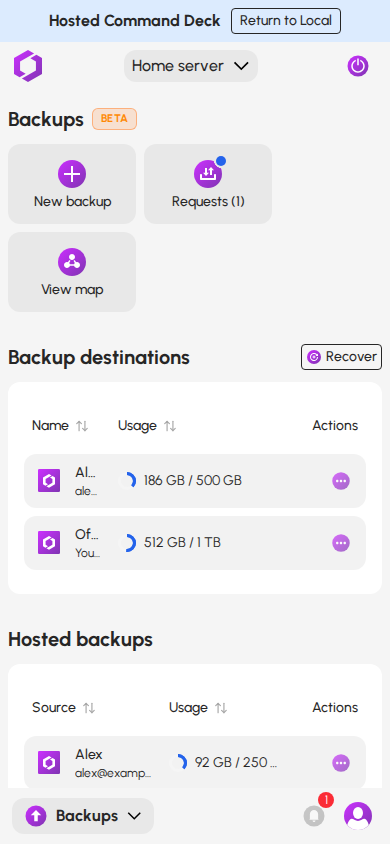
Click Backups in the sidebar. The Backups page lists the backups this server sends and the backups it stores for others. The dashboard also has a Backups section with one card for each place this server backs up to.
The Backups page also works in your phone's browser.
The Backups page on a phone
¶ Compression
Backups are stored compressed. The space a copy takes on the other server is usually smaller than the total size of the files in your folders.
A backup's Quota card shows the space in use as "1.8 GB of 20 GB": how much the copy uses, out of the space set aside for it. The first number is the compressed size, so it rarely matches the size of your files. It also includes your older restore points.
How much smaller a copy gets depends on the files. Photos and videos are already compressed, so they shrink very little. Documents and other text often shrink a lot.
When you set up a backup, HexOS suggests how much space to ask for. The suggestion is based on the space your folders take on your pool, plus room to grow.
¶ What Buddy Backups is not
- It is not a long-term archive. Restore points are kept for the time you choose: 1 week, 2 weeks, 1 month, or 3 months. It protects you from a disaster or a recent mistake, not from something deleted a year ago.
- It does not restore single files. You restore a whole folder as a folder, then take what you need from it.
- It is not a sync service. Your files do not appear on other devices, and changes on one server do not change the other.
- It does not replace a healthy pool. Keep your drives healthy. A backup is your second copy, not your first.
¶ Where to go next
| I want to… | Guide |
|---|---|
| Set up my first backup | Set up a backup |
| Store a backup for a friend | Host a buddy's backup |
| Change what is backed up, how often, or how fast | Manage your backups |
| Get a folder back | Restore a folder |
| Rebuild after losing a server | Recover a failed server |
| Know what each removal deletes | Removing backups |
| Understand a notice or fix a failed backup | Backup troubleshooting |
| Read the technical details | How Buddy Backups works |