¶ Backup troubleshooting
Info: Buddy Backups is in beta. Everyone can use it, and every backup it makes is a real copy you can restore. Beta means we are still finishing it, so screens may change and you may find a rough edge. Keep any backup you already rely on running alongside it. What beta means
When something goes wrong, HexOS tells you in three places:
- The folder's row on the backup's page says what went wrong, with Show details.
- Notes on the backup's page explain problems with the other server.
- Notices in the Command Deck tell you about things that happen while you are away.
Find what you see below.
¶ A folder's backup failed
A folder whose last backup failed shows the reason in its row. Click Show details to open the Backup failed dialog. It says what happened, what to do, and offers the right button.
The Backup failed dialog
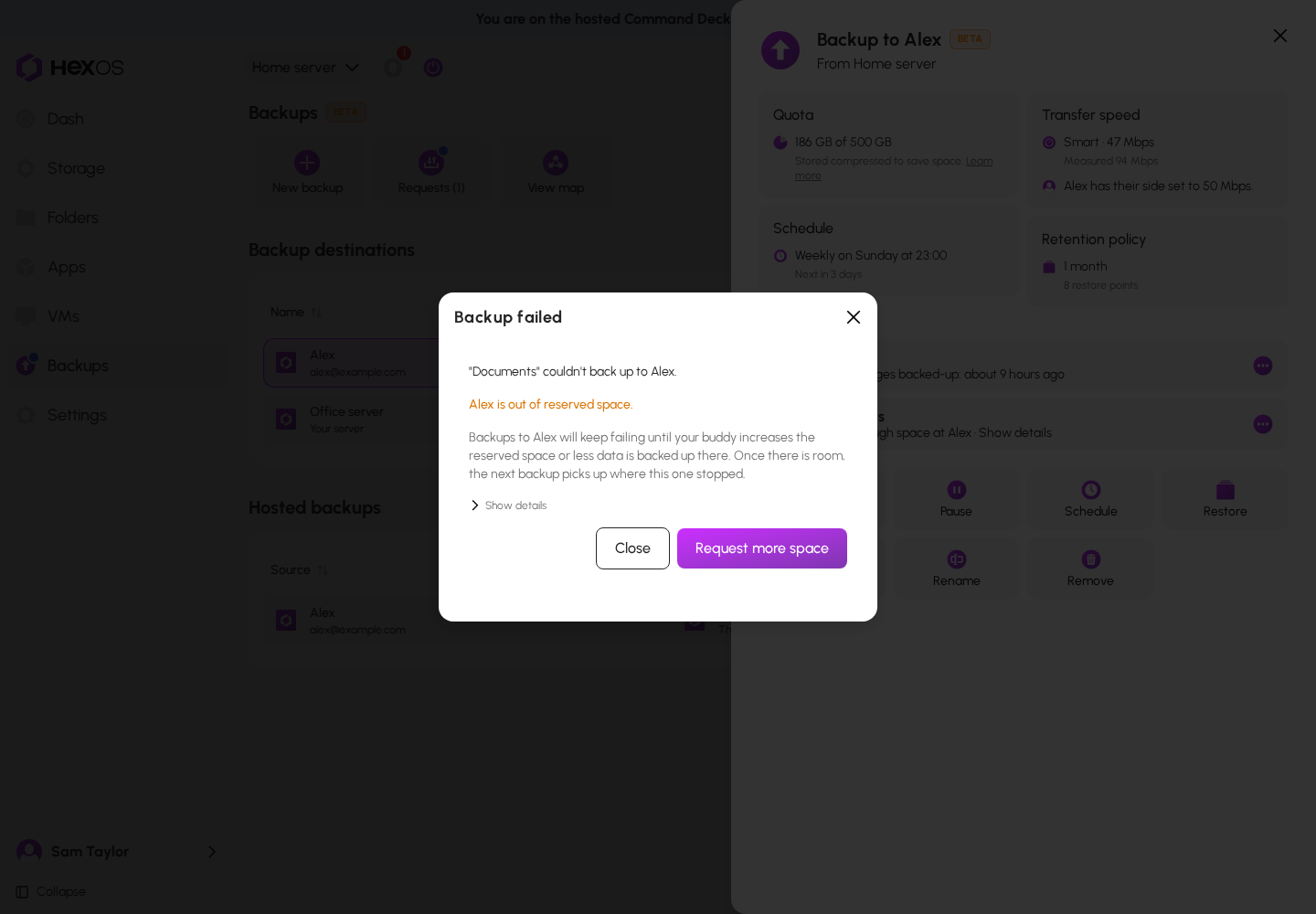
| The row says | What happened | What to do |
|---|---|---|
| "Not enough space at" the other server | The space set aside is full. | Get more space. See Out of space. |
| "Needs a fresh full copy" | The backup history on the other server no longer lines up with this folder. | Click Repair backup. See Repair a backup. |
| "Copy on" the other server "was changed" | Something outside HexOS changed the copy on the other server. | The next backup sends what changed. If it keeps failing, repair the backup. |
| "Transfer to" the other server "was cut off" | The transfer stopped before it finished. What arrived was kept. | Nothing. The next backup continues from there. If it keeps happening, check that both servers stay online during the backup. |
| "Couldn't reach" the other server | The other server could not be reached. | Check that it is online and connected. Backups continue on their own once it is. |
| The other server "refused the connection" | The other server turned the connection away. | Click Back up now to try again. If it keeps happening, remove the connection and set it up again. |
| "Previous backup still running" | A backup started while the last one was still going. | Wait for it to finish, or stop it in the activity center, then try again. |
| "A drive couldn't read part of this folder" | A drive on your server could not read part of the folder. | Check Storage for drive errors. Backups of this folder keep failing until the drive is replaced and the damaged files are restored or removed. |
| "Last backup failed" | HexOS does not recognize the reason yet. | Click Back up now. If it keeps failing, check that both servers are online and that there is space left. |
¶ Repair a backup
Repair backup starts a folder's copy over. Use it when a folder shows "Needs a fresh full copy", when the copy keeps failing after it was changed, or when part of the copy is damaged.
- Open the folder's menu and click Repair backup. You can also click it in the Backup failed dialog.
- Read the dialog "Repair the backup of" the folder. It explains that the copy on the other server is deleted and the whole folder is sent again.
- Check "I understand that repairing deletes this folder's copy on" the other server "and sends the folder again from scratch."
- Click Repair backup.
The Repair backup dialog
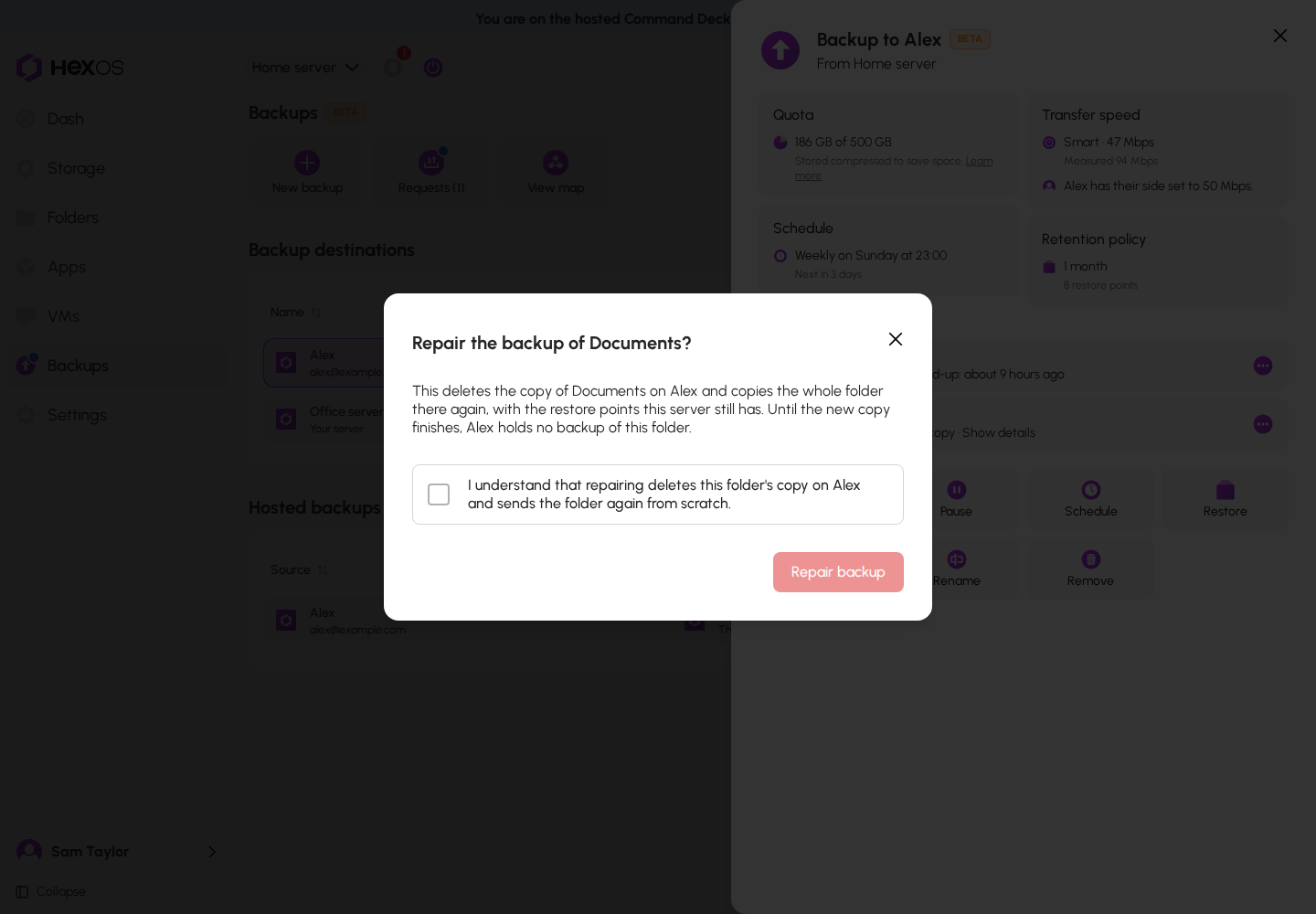
Warning: Until the new copy finishes, the other server holds no backup of this folder. The repair sends the restore points your server still has, so it takes longer than a normal backup.
The progress shows in the activity center. HexOS checks first and will not start a repair it can tell would fail. For example, if a fresh copy would not fit in the space set aside, it says so and deletes nothing.
¶ A damaged copy
If the other server had a drive problem, part of your copy there may not be readable. The folder's row says "Part of the copy on" the other server "can't be read". Click Show details to open Backup copy damaged. It says which restore points are affected, and which files when the other server can tell.
- Your original folder on your server is not affected.
- Until the backup is repaired, restoring this folder can fail. In the restore dialog, the affected restore points are marked Damaged.
- Click Repair backup to send the folder again. Wait until the other server's storage is healthy first, or the new copy can land on the same failing drive.
While a repair runs, the row says "Repairing: copying again to" the other server.
¶ Problems with the other server
The backup's page shows a note when the other server has a problem:
| The note says | What it means |
|---|---|
| The other server "is offline. Backups continue once it's back online." | The other server is switched off or disconnected. Nothing is paused. Backups start again when it returns. You cannot click Back up now until then. |
| "HexOS isn't running on" the other server | The other server is on, but HexOS is not running there. Scheduled backups still run, but nothing can be started, stopped, or checked until HexOS is back. |
| The other server's "storage is degraded" | A drive in its pool has failed. Your copy has no spare protection until the drive is replaced. |
| The other server's "storage is rebuilding" | Its pool is rebuilding onto a new drive. Your copy has no spare protection until that finishes. |
| The other server's "storage has stopped working" | Backups to it cannot run, and restoring from it may not work until it is fixed. |
If you store a backup for a buddy and your own drives damage part of it, your backup's page says so. Your buddy is told, and can repair it once your storage is healthy.
¶ Out of space
Every few hours, while the sending server is online, HexOS checks whether the next backup will fit in the space set aside. A backup can still stop if the space fills before the check runs.
"Backup to" your buddy's name "needs more space": the next backup will not fit, or the last one stopped because the space ran out. The notice says how much is needed, and either "No space is left for future backups." or how much is still free. You and your buddy both get a notice.
Do one of these:
- Get more space. If you own the other server, click the Quota tile and raise it. If a buddy stores it, ask for more: see Space for your backup.
- Back up less. Remove folders in the Folders dialog.
- Keep restore points for less time in Schedule & Retention.
If the other server's pool is full, the notice says so, because more space set aside would not help. The owner of that server needs to free space, or move the backup with Change pool.
Paused for space: when HexOS is sure the next backup cannot fit, it pauses the backup instead of letting it fail. The page says "Paused because the next backup would not fit in the reserved space." Either side can resume it, and it resumes on its own once there is room.
Nearly full: when 90% of the space is used, you get "Backup space at" the other server "is" a percentage "full", and the server storing it gets "Space you share with" your name "is nearly full". When the space is full or almost full, both of you also get one email.
¶ Notices you may receive
| Notice | What it means |
|---|---|
| "[name] accepted your backup request" | Your buddy accepted. The connection is being set up. |
| "Backups paused for [name]" | The other side paused, or HexOS paused it (for space, or because access changed). Everything already stored stays. |
| "Backups to [name] may have stopped" | No backup has finished for longer than expected (at least 7 days). You also get an email. Check that both servers are online, then click Back up now on a folder. |
| "A backup you host for [name] has stopped arriving" | You store a backup that has not received anything in a while. Nothing you store for them was lost. Their server may be off. |
| "Backup buddy [name] unreachable" | The other server has been offline for over 10 days, and your backups there are not updating. Check with your buddy, or set up another destination. A reset of their server deletes the backups it stores. |
| "Backup to [name] is failing" | Recent backups have not completed. Open the backup and check its folders. |
| "Backups to [name] are working again" | A backup finished after problems. You are protected again. |
| "Part of your backup on [name] can't be read" | The other server had a drive problem. See A damaged copy. You also get an email. |
| "[name] is repairing your backup" | The server storing your backup lost part of it, so your server is sending it again. Your backups keep running. |
| "[name] removed your backup connection" | The other side removed the connection, and its copies are deleted. Set up a new backup if you need one. |
| "Your connection to [name]'s server was moved to [server]" | The backup was recovered onto another of your servers. None of this server's folders or restore points were deleted. |
| "[folder]" is waiting for its passphrase | A restore finished copying and needs the folder's passphrase. See A restore is waiting for a passphrase. |
| "[folder]" restored from backup | A restore finished. |
¶ Setup will not finish
HexOS tries failed setup steps again on its own, first within about 10 minutes and then less often after each failure. After about a day of failures it stops, and the activity item says "Stopped trying automatically after several failed attempts." To try again sooner, or after it stops, use Retry now in the activity item, Retry on the backup's page, or Retry setup in the row's menu. Each one starts the automatic tries over. Cancel setup, then Cancel setup again in "Cancel this backup setup?", stops it. On a new backup, cancelling loses nothing, because nothing was backed up yet.
Danger: On a backup you recovered onto a new server, Cancel setup deletes every copy the backup holds. Use Retry now instead. See Known issues.
Common causes:
- The other server is offline. Both servers must be online at the same time. Setup waits while one is offline and continues on its own once it is back, so you do not need to retry.
- One server lost its connection to HexOS. Check it on the dashboard.
- You are hosting. Use Retry on the backup's page. The row menu's Retry setup is only on the sending side.
¶ A folder cannot be added to a buddy's backup
A folder must be encrypted before it can go to a buddy. In the backup's Folders dialog, folders that are not encrypted are listed with an Encrypt… button. On a folder's own page, the Backup dialog offers Encrypt folder…. When encryption finishes, HexOS adds the folder to the backup for you. See Turning on encryption.
If the folder is already backed up to one of your own servers, it cannot be encrypted yet. Remove it from that backup first, then encrypt it.
If encryption finished but the folder was not added, HexOS says so. Add it again from the backup's Folders dialog.
¶ A removed folder's copy is still on the other server
If you removed a folder, or deleted a backed-up folder, while the other server was offline, its copy is deleted when that server is back online. A copy left by a removal made before this fix stays: add the folder back to that backup and remove it again while both servers are online, or remove the whole connection.
While that copy is still owed, moving the backup to another pool or server says "A removed folder's copy is still being deleted. Try the move again in a few minutes." Wait until the other server is online, then try the move again.
¶ SSH is still on after your server stopped storing backups
HexOS turns SSH off only if HexOS turned it on and nothing else on your server can log in with SSH. SSH stays on if:
- SSH was already running, or set to start automatically, before your server stored a backup.
- Something else can log in with SSH: an SSH key or SSH password on any account, a directory service such as Active Directory, or custom SSH settings.
- Your server started storing backups before HexOS could turn SSH off again.
If someone was still connected over SSH when the last backup was removed, HexOS tries again every hour.
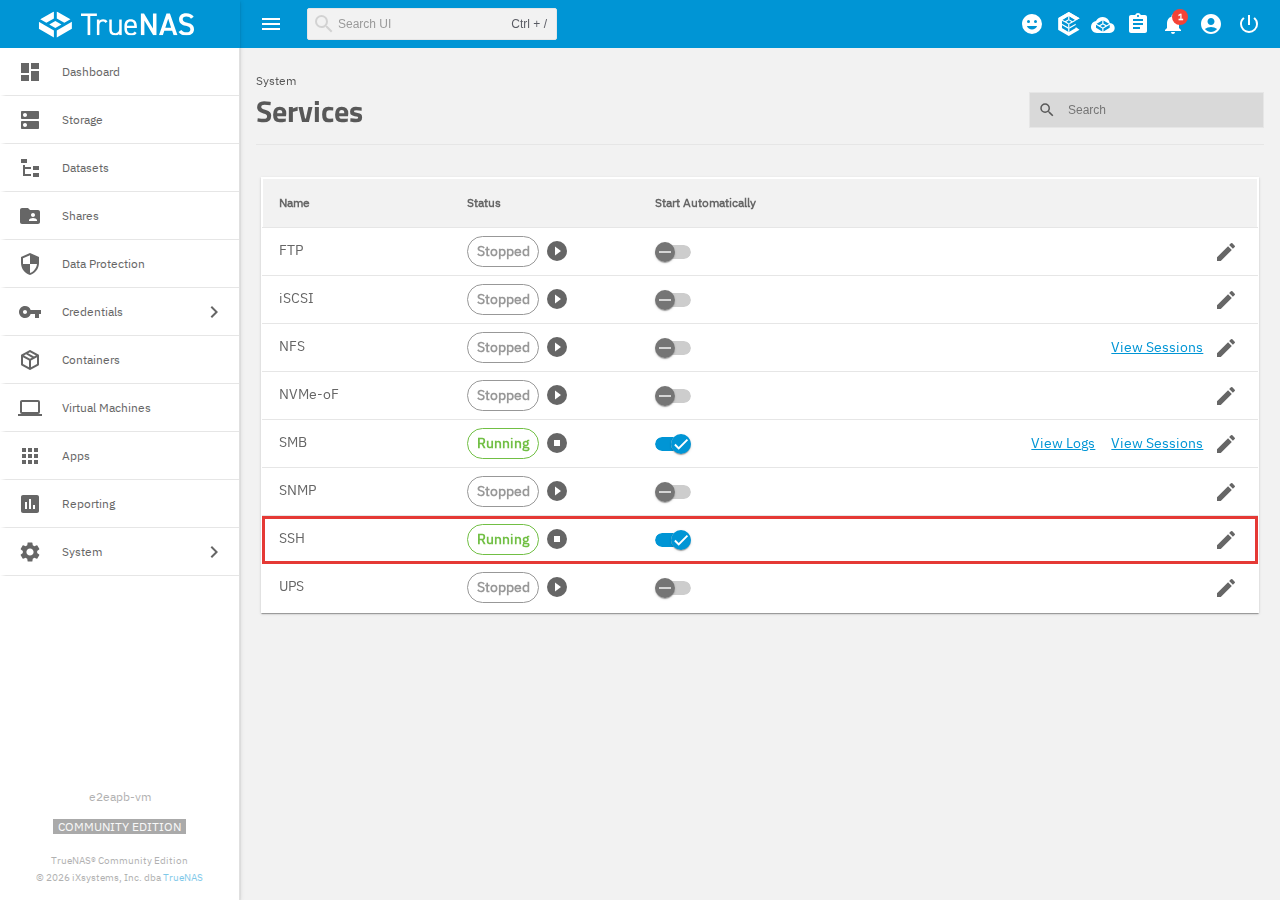
If your server stores no backups and you do not use SSH, turn SSH off in TrueNAS:
- Click System > Services.
- On the SSH row, click the stop button so Status shows Stopped.
- Click the Start Automatically switch to turn it off, so SSH does not start again when the server restarts.
TrueNAS services
Warning: Do not turn SSH off while your server still stores a backup. Your buddy's backups stop until it is back on.
¶ Recovering a paused backup
A paused backup can be recovered onto a new server. It stays paused there until it is resumed. If your buddy paused it, ask them to resume it.
¶ You cannot delete a folder
A folder that is backed up can only be deleted together with its backup copies. The delete dialog says so and asks you to confirm. See Removing backups.
¶ Backups are on the hosted deck
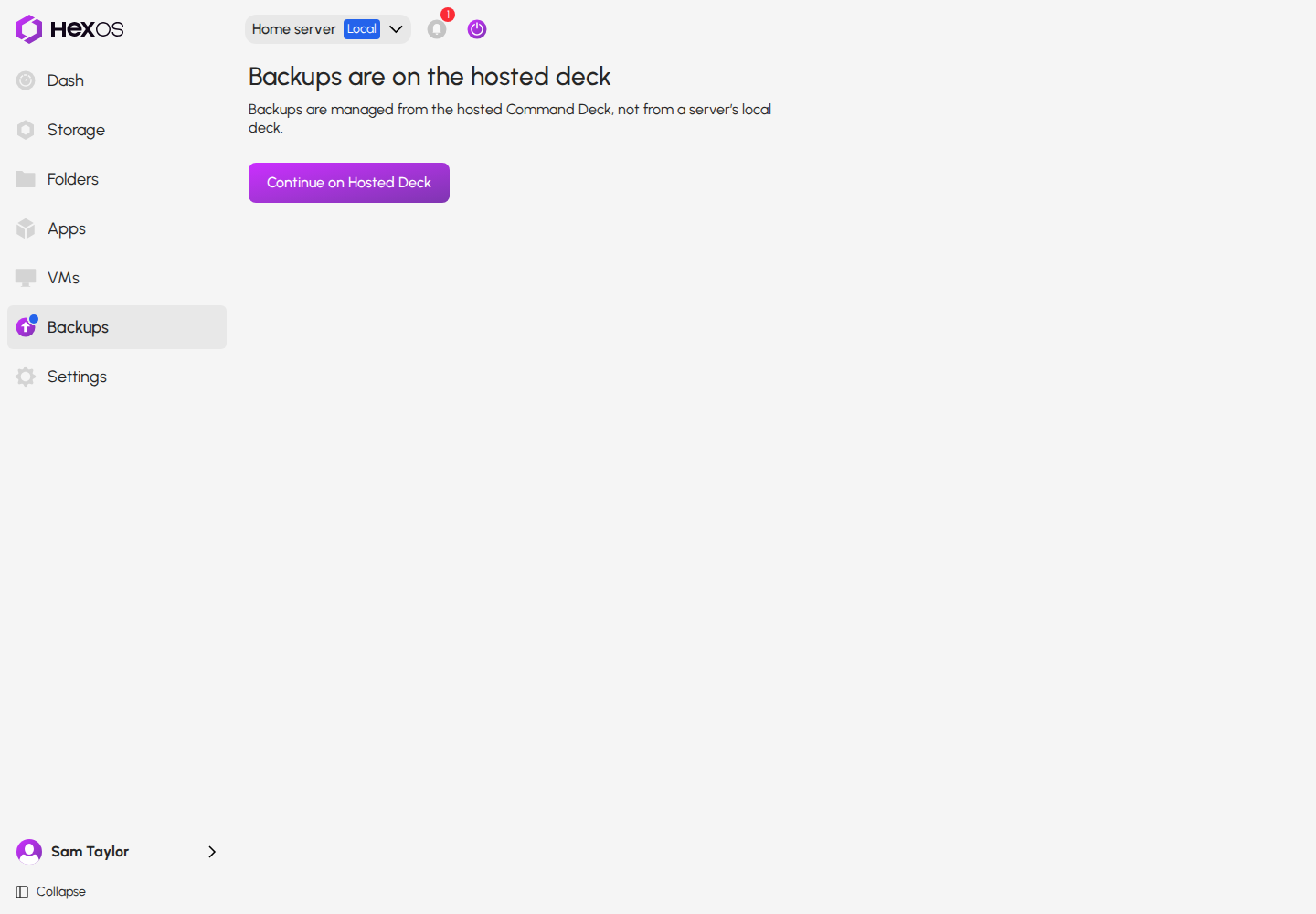
Your server is running an older version of HexOS. Its local deck shows "Backups are on the hosted deck" on the Backups page. Click Continue on Hosted Deck to manage backups there. Once your server updates HexOS, the Backups page works on its local deck too.
Backups on an older server's local deck
¶ The destination list is empty
Only online servers can be chosen as a destination. Turn on the other server, wait until it shows as online, and try again. A server that already stores this server's backup is not listed either.
¶ Resume is refused
- If your buddy paused the backup, only they can resume it. The page says "Backups were paused from the other side of this connection, and only they can resume them." Ask them.
- If HexOS paused it for space, free up space first. It also resumes on its own when there is room.
- If resuming fails, HexOS says "Backups couldn't be resumed. Try again in a moment". Wait a minute and try again.
¶ A restore is waiting for a passphrase
A restore started without a passphrase copies the data, then waits for the passphrase. Open it in the activity center and click Enter passphrase. A wrong passphrase can be tried again. If you cannot find it, click Discard restore to remove the locked copy. An encrypted folder cannot be opened without its passphrase.
¶ A restore did not finish
A restore that failed or was stopped can leave a copy behind. The backup's page lists it under Restores needing attention. Click Remove copy to free the space. See Restore a folder.
¶ A request was never accepted
HexOS does not email your buddy. Ask them to click Backups in the sidebar, then Requests. If the email address has no HexOS account, the request waits until someone signs in with it. To fix a wrong address, withdraw the request and send a new one.
Help: Still stuck? Ask in the HexOS Discord Community. Say what the folder's row or the notice says, and whether you send the backup or store it.