¶ Restore a folder
Info: Buddy Backups is in beta. Everyone can use it, and every backup it makes is a real copy you can restore. Beta means we are still finishing it, so screens may change and you may find a rough edge. Keep any backup you already rely on running alongside it. What beta means
A restore brings a backed-up folder back onto your server as a folder. It never overwrites a folder you already have. You can restore to check a file, compare versions, or undo a mistake without risk to the current folder.
Only you can restore your own backups. The buddy who stores your copy cannot open or restore it.
¶ Before you start
- Restore from the server whose folder it is: the one that sends the backup.
- The backup must not be paused. A paused backup has no Restore. Resume it first.
- The server that stores the backup must be online. If it is offline, the dialog says it cannot list restore points yet.
- The pool you restore to needs room for the whole folder.
- If the folder uses a passphrase, have it ready. The restore cannot finish without it.
Info: If HexOS manages your folder keys (the default), restored folders unlock on their own while you are signed in. See Recovery keys.
¶ Start a restore
- Open the backup that holds the folder: click its row on the Backups page, or its card in the dashboard's Backups section.
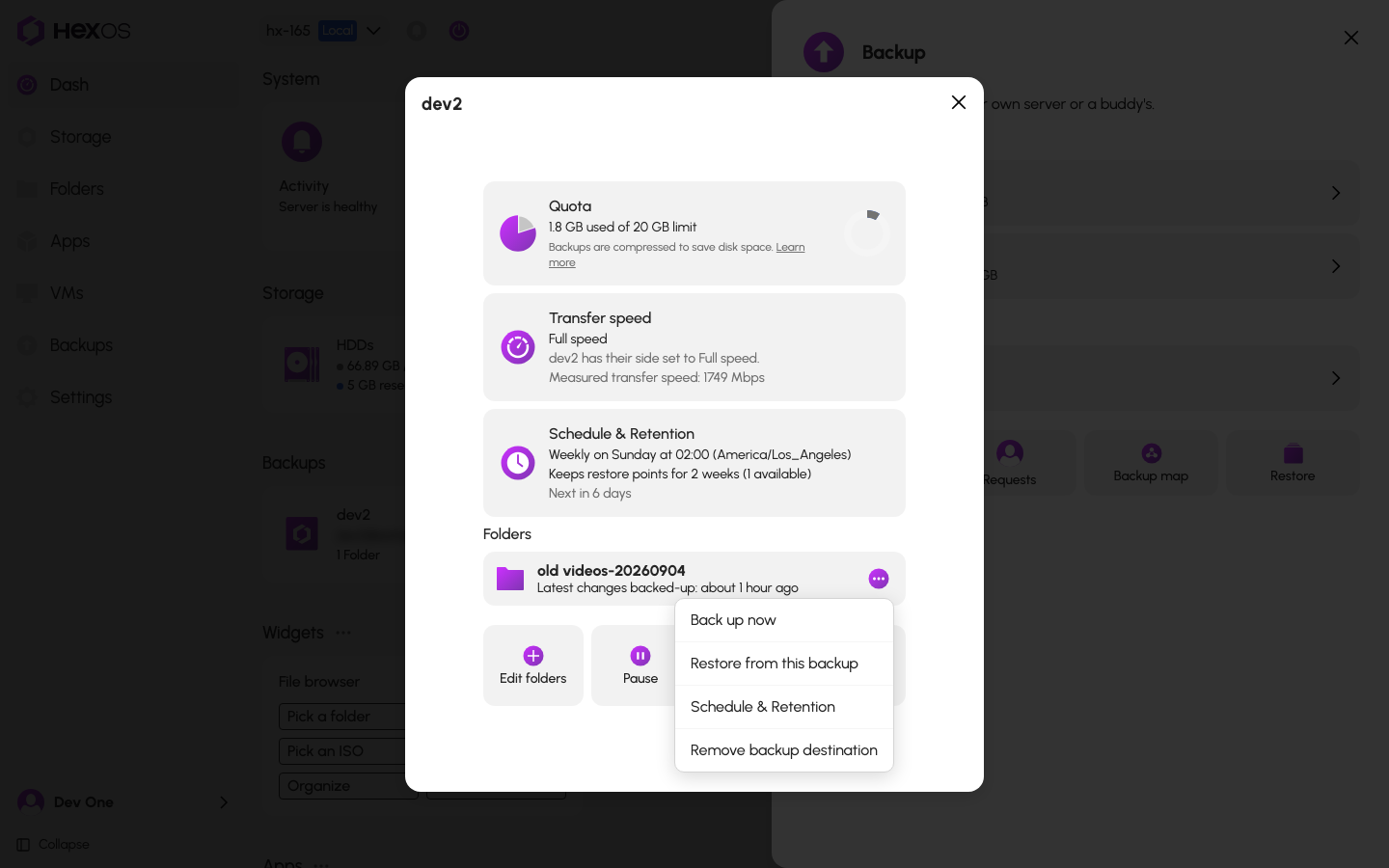
- Open the folder's menu and click Restore from this backup. You can also click the Restore tile and pick the folder.
The folder's menu
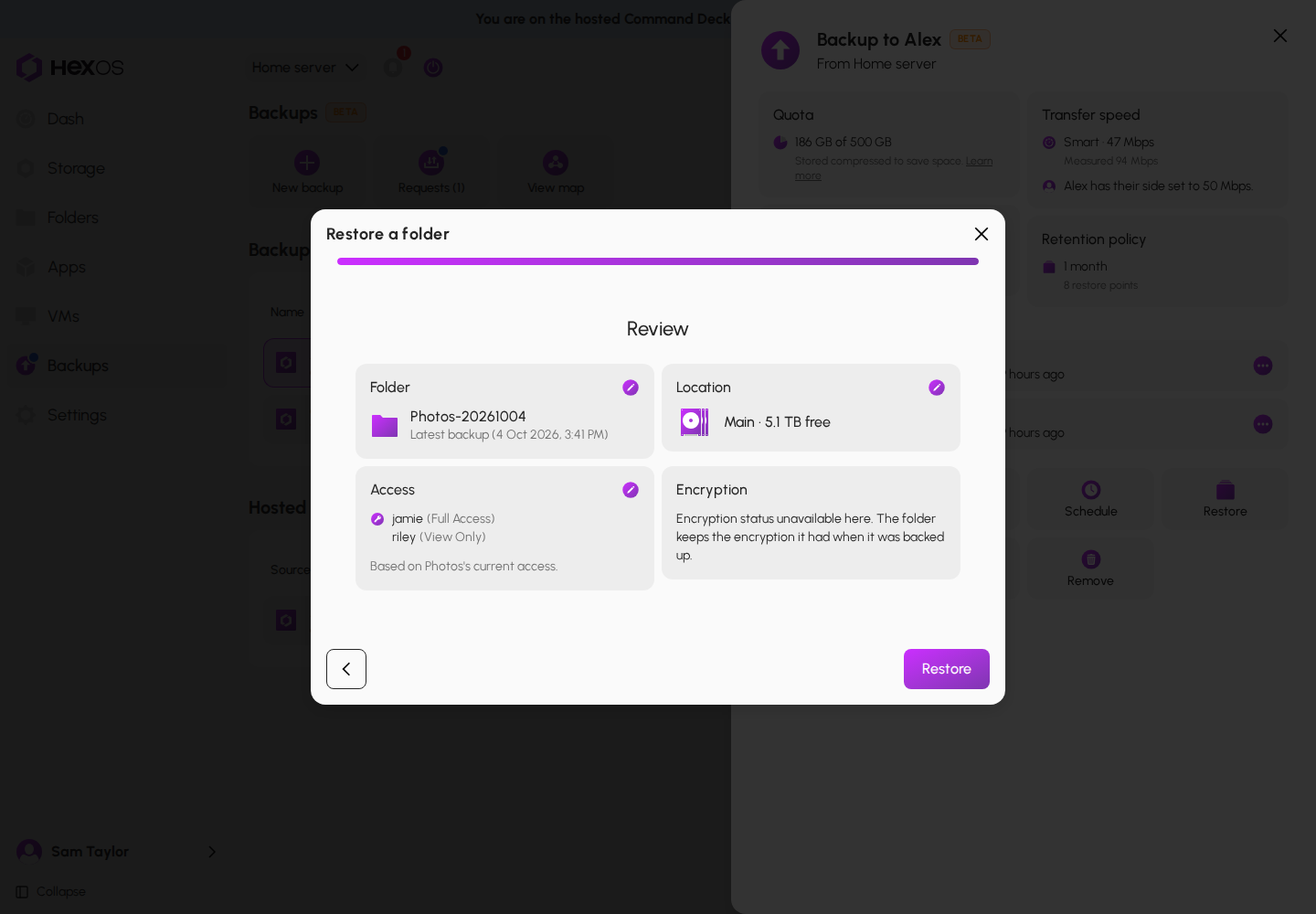
- Restore a folder opens on a review once it has everything it needs: the folder and its name, the restore point, the pool, and who can open the folder. Check each card.
The review
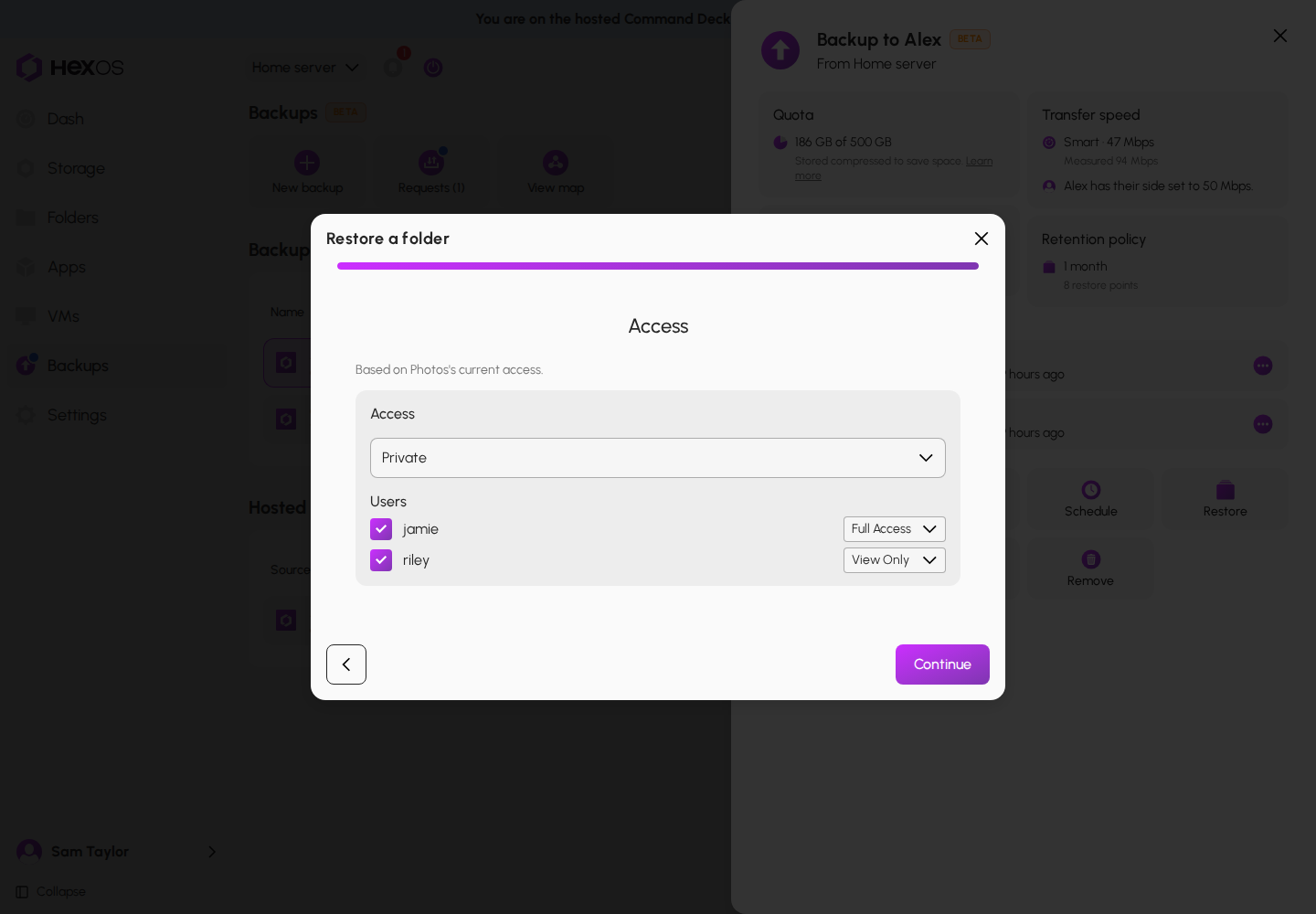
- Who can open it. If the original folder is still on this server, HexOS copies its access: "Based on" the folder's "current access". If it is not, nobody can open the restored folder over the network until you add people: the card says "No users assigned. Add users to give them access." To change it, click the pencil on the Access card, choose Public (Everyone) or Private, tick the people who can open it and pick Full Access or View Only for each, then click Continue.
The Access step
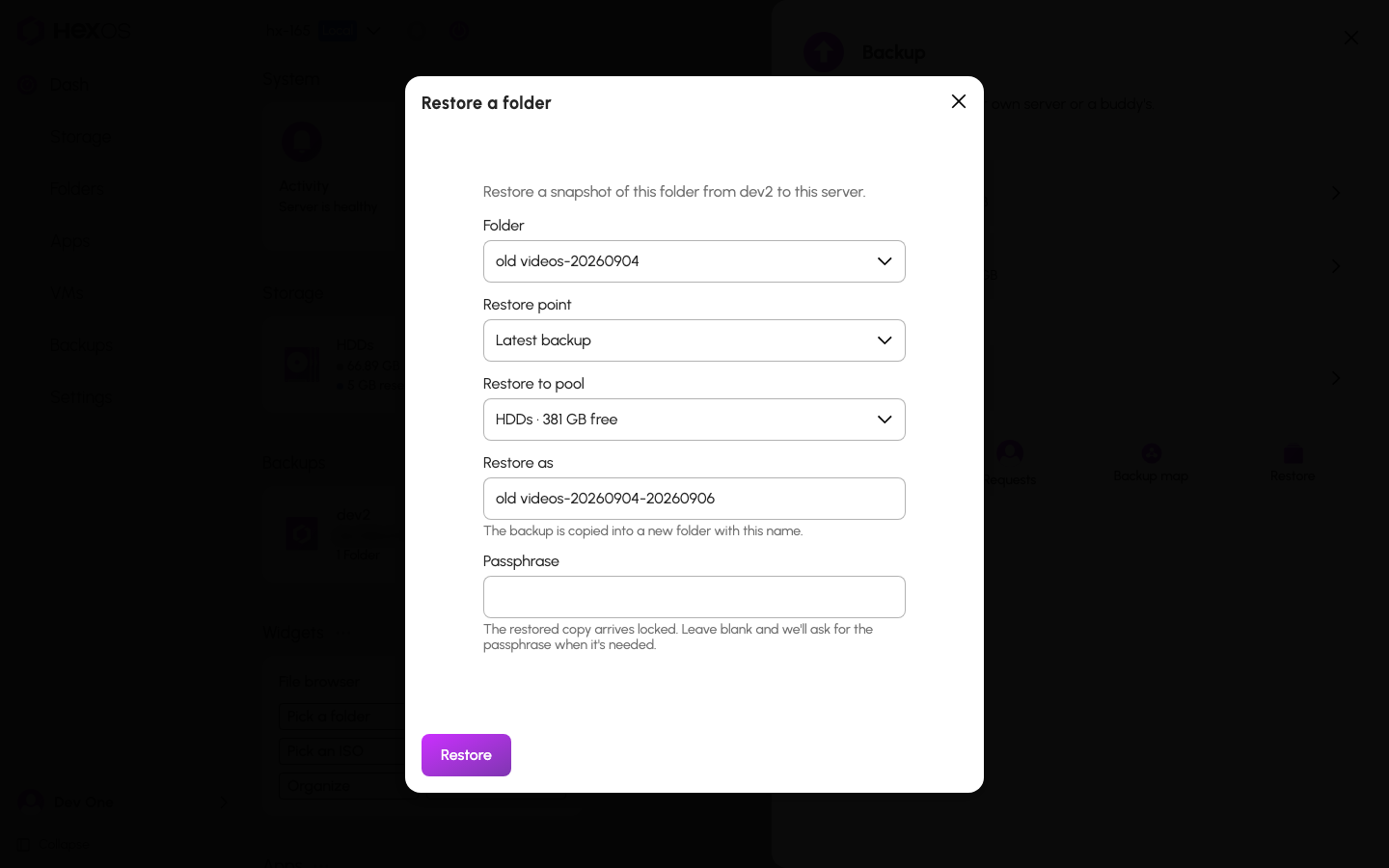
- Something else to change? Click the pencil on the Folder card to pick another restore point, change the name under Restore as, or type the folder's passphrase. "Latest backup" is the newest restore point, with its date. HexOS suggests the folder's own name if you have no folder by that name; if you do, it adds the restore point's date, for example "Photos-20261005". If the folder uses a passphrase and is still on this server, you can type it under Passphrase (optional), or leave it empty and type it later. Click the pencil on the Location card to pick another pool; a pool without enough room is marked "not enough space" and cannot be chosen.
The Folder step
- Click Restore.
If something is still loading when the dialog opens, it starts on the first step instead. Click Continue through the steps to reach the review.
HexOS confirms with "Restore started" and closes the dialog. Follow the restore in the activity center.
Warning: A restore point marked Damaged cannot be fully read on the other server, so its restore may stop partway. Pick another restore point, or repair the backup first. See Backup troubleshooting.
You can also restore from a folder's own page: under Backing up to, open the backup's menu and click Restore from this backup.
¶ Unlocking the restored folder
A restored encrypted folder arrives locked.
Key managed by HexOS: the folder unlocks on its own while you are signed in. If it cannot unlock on its own, the restore says "Couldn't unlock automatically". Click Continue, then Continue restore in "Continue the restore".
Passphrase: if you typed the passphrase in the dialog, the restore copies the data and unlocks the folder in one go. If you left it empty, the restore copies the data first, then waits. You get a notice that the folder "is waiting for its passphrase".
To finish a restore that is waiting:
- Open the restore in the activity center and click Enter passphrase. Or, on the backup's page under Restores needing attention, click Unlock.
- Type the passphrase and click Unlock and finish.
If the passphrase is wrong, you can try again. If you cannot find it, click Discard restore, then Discard restore again in "Discard this restore?". That removes the locked copy from your server; anything left behind shows under Restores needing attention. The backup itself stays, so you can restore again later.
Tip: For a large folder with a passphrase, start the restore without it. The data copies while you look for the passphrase, and HexOS asks for it when the data has arrived.
¶ While it runs
The activity center shows the progress. A large folder can take a long time. To stop a restore, open it in the activity center and click Stop restore.
Warning: Let a restore finish before you remove the folder from the backup or remove the connection. Removing either deletes the copy the restore reads from.
¶ After it finishes
You get a notice that the folder was restored. It says who can open it, for example "Your folder is back. Sharing access was granted to" the people you chose. If someone you chose is no longer on this server, the notice says they "could not be matched to the accounts you selected, so they were left out." The folder shows with your other folders, on the pool you chose. Your original folder, if it still exists, is unchanged.
To change who can open the folder later, see Folder permissions.
Warning: Folders restored before restores asked who can open them came back open to everyone on your network, with no password. If you restored a folder before then, set who can open it. See Folder permissions.
¶ If sharing could not be finished
Your files are restored, but the folder is not shared yet. The restore says one of these:
- "Your files are restored, but HexOS could not finish setting up sharing. Try again." On the backup's page, under Restores needing attention, click Try again. Nobody can open the folder over the network until it finishes.
- "Update this server, then press Try again to finish sharing the folder." Update HexOS on this server, then click Try again.
- "Your files are restored, but HexOS could not verify the network share settings. It has stopped setting up sharing. Contact support." HexOS found a network share for the folder that it did not set up, and changed nothing. Ask in the HexOS Discord Community.
A restore waiting for Try again
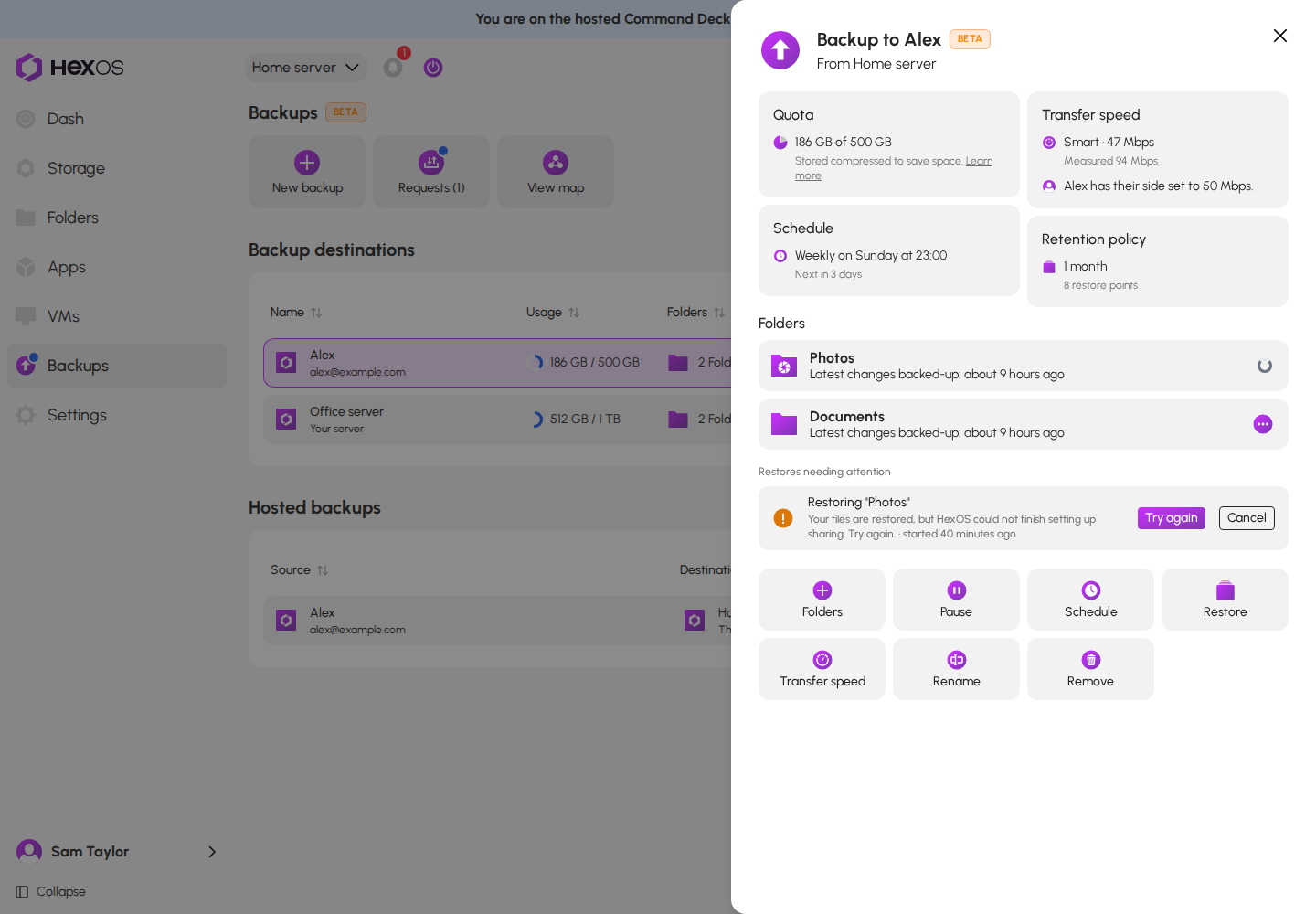
Cancel on a restore like this keeps the restored files.
¶ A restore that did not finish
A restore that failed or was stopped can leave a copy behind. The backup's page then shows it under Restores needing attention: "Left a copy on this server as" and the name, "that never became a folder."
- Click Remove copy.
- In "Remove the leftover copy?", click Remove copy.
This frees the space. The backup itself stays where it is.
¶ What you can and cannot restore
Whole folders only. You cannot pull back a single file. Restore the folder, copy out what you need, then delete the restored folder if you no longer want it.
Any restore point you still keep. You choose how long restore points are kept in Schedule & Retention: 1 week, 2 weeks, 1 month, or 3 months. Older ones are removed at each backup.
Warning: Restore points are not an archive. If you need a version for longer than you keep restore points, restore it now and keep it as its own folder.
¶ If your server is gone
This page assumes your server still works. If the server itself is lost, the copies on the other server are kept, and a new server on your account can take them over. See Recover a failed server.
Help: A restore waiting on a passphrase you cannot find, or one that will not start? See Backup troubleshooting or ask in the HexOS Discord Community.