¶ Set up a backup
Info: Buddy Backups is in beta. Everyone can use it, and every backup it makes is a real copy you can restore. Beta means we are still finishing it, so screens may change and you may find a rough edge. Keep any backup you already rely on running alongside it. What beta means
This guide sets up a backup of your folders to another server. A buddy's server needs your buddy to accept a request first. Another server you own starts straight away.
¶ Before you start
- Both servers must be online while the backup is set up.
- Folders for a buddy must be encrypted. If a folder is not encrypted yet, you can turn on encryption first. You can also add it later: the backup's Folders dialog offers to encrypt it. Backups to your own server can include any folder.
- Have your buddy's HexOS email ready if you back up to a buddy.
¶ Start a new backup
- In the sidebar, click Backups.
The Backups page
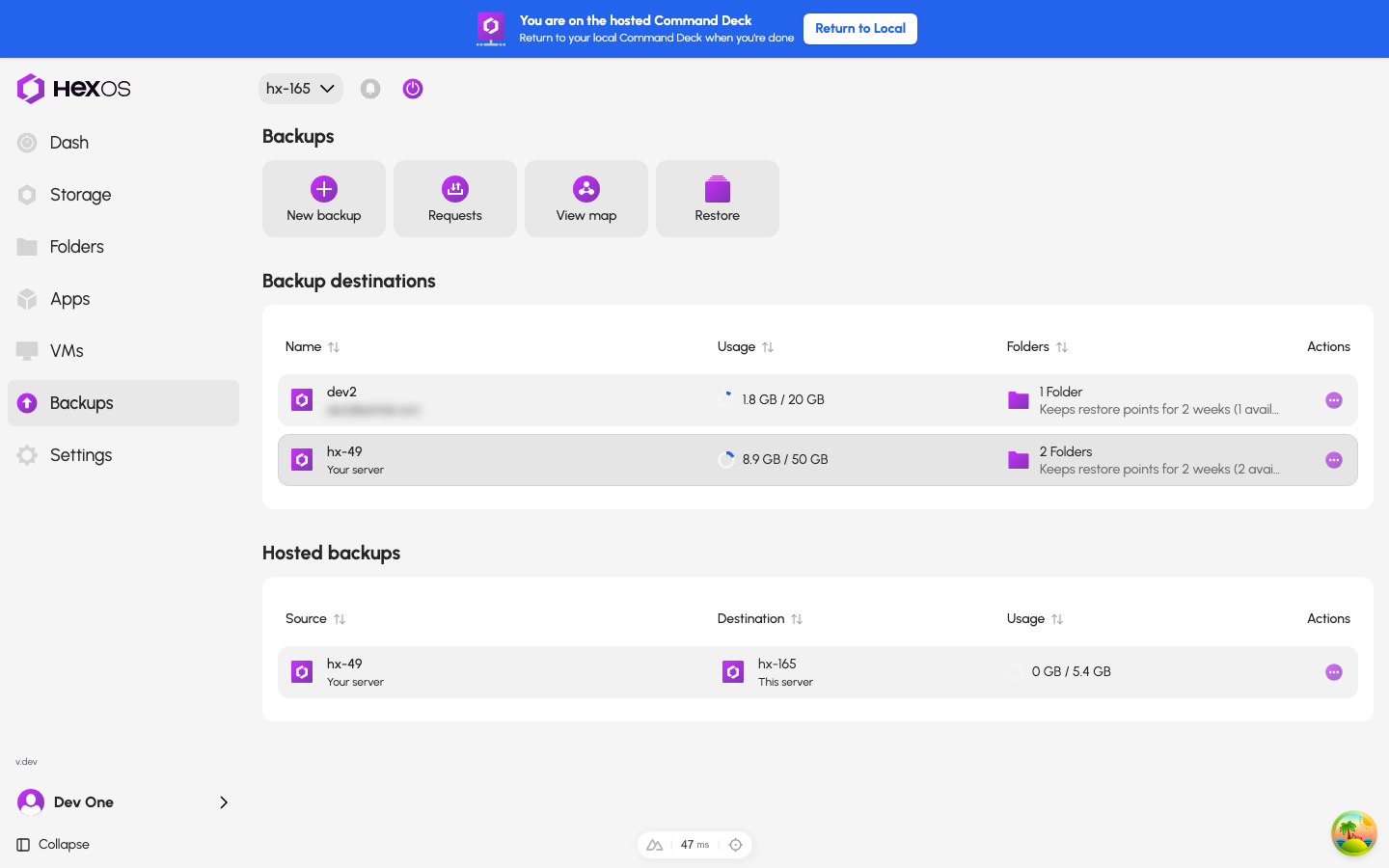
- Click New backup.
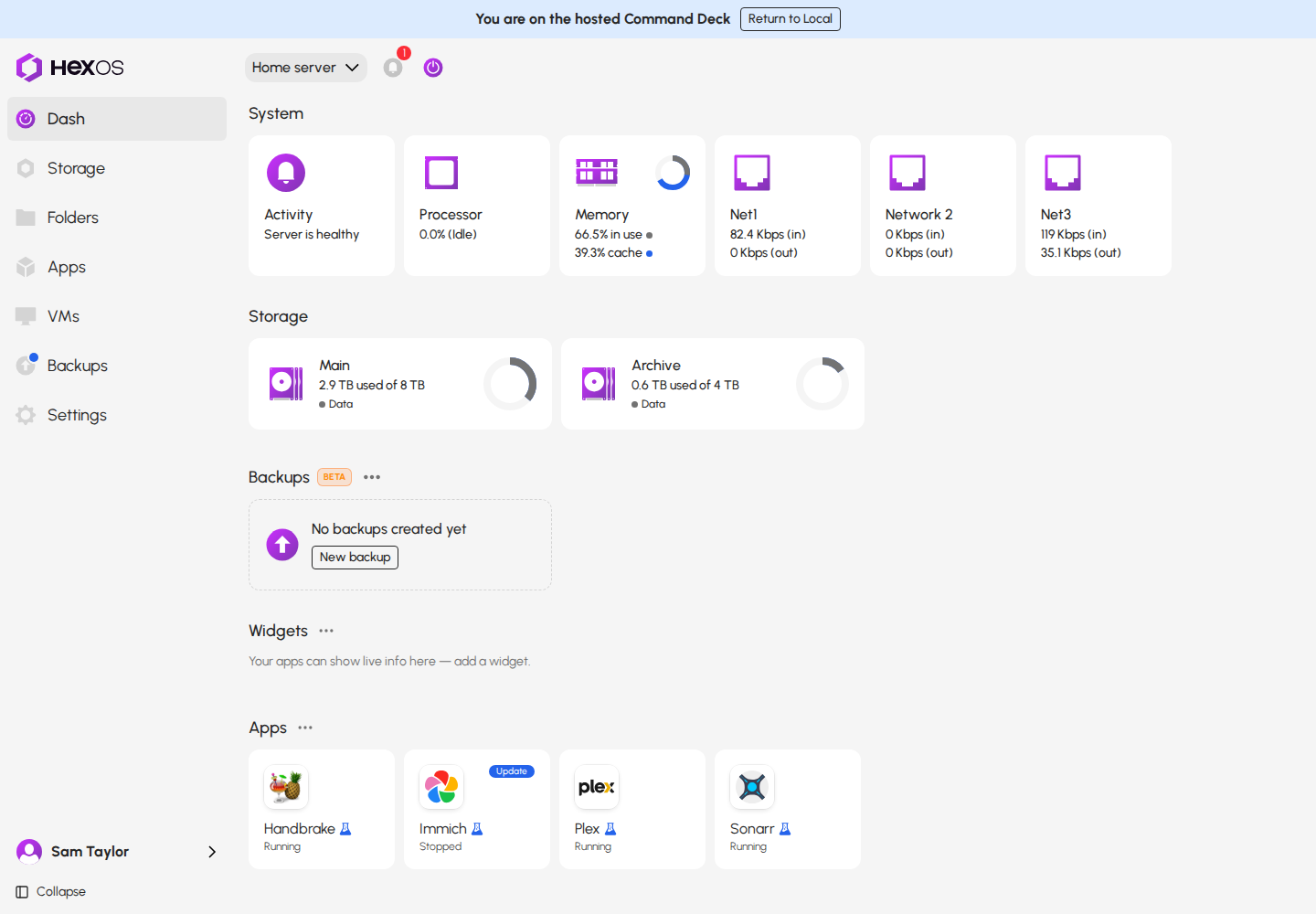
If this server has no backups yet, you can also click New backup in the Backups section of the dashboard.
The dashboard with no backups yet
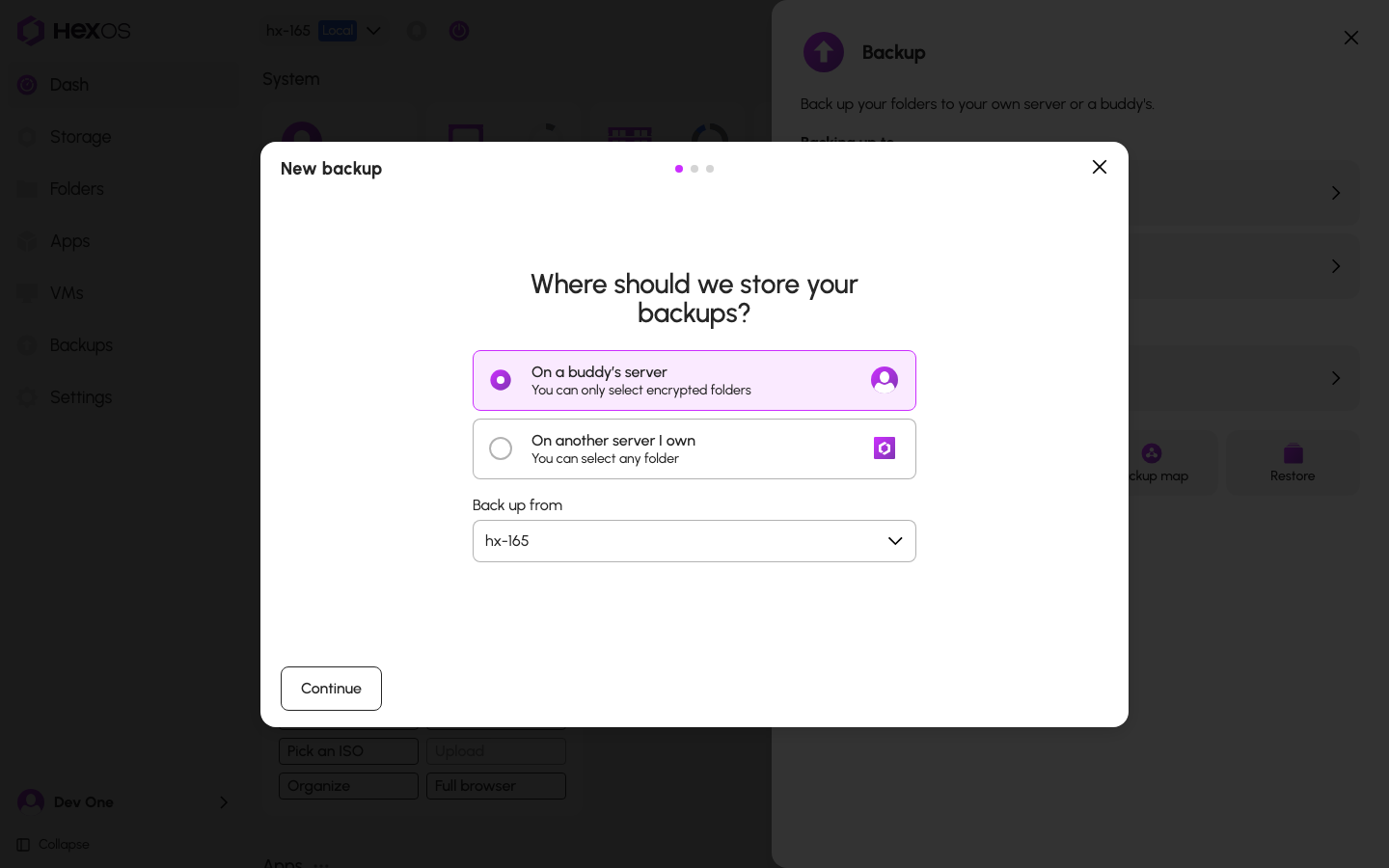
- The first question is "Where should we store your backups?". Click On a buddy’s server or On another server I own.
- If you have more than one server, choose the server to back up under Back up from.
- Click Continue.
Choosing where the backup goes
The next steps depend on your choice. Each step has a name on the side of the dialog. Click a step's name to go back to it.
¶ Back up to a buddy
The steps are Request, Folders, Options, and Review.
¶ Request
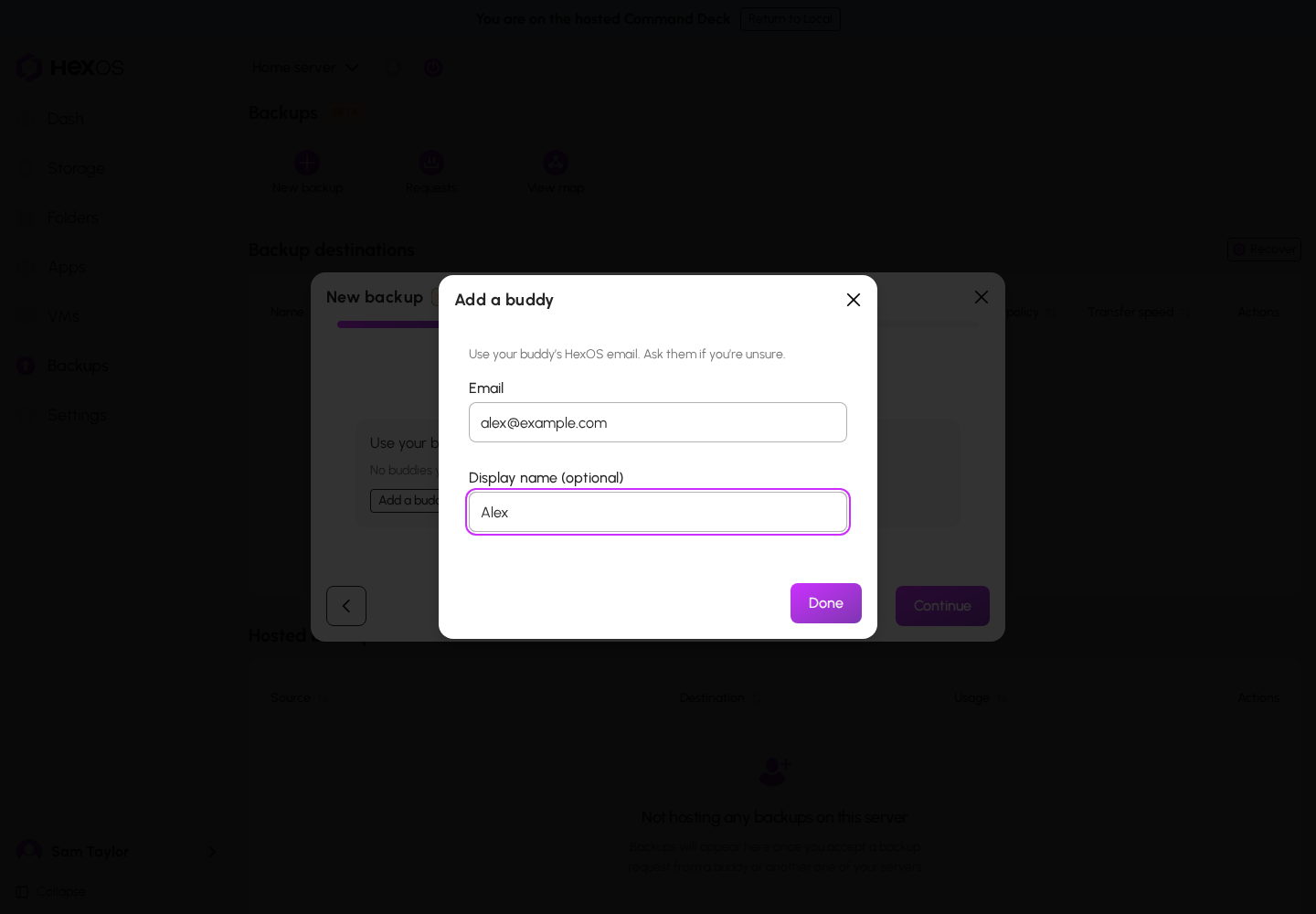
- Click Add a buddy.
- Enter your buddy's HexOS email under Email. You can also give them a name under Display name (optional). Only you see this name.
- Click Done.
The Add a buddy dialog
To back up to more than one buddy at once, click Add another. You can add up to 5 buddies. Each buddy gets their own request.
A buddy on the Request step
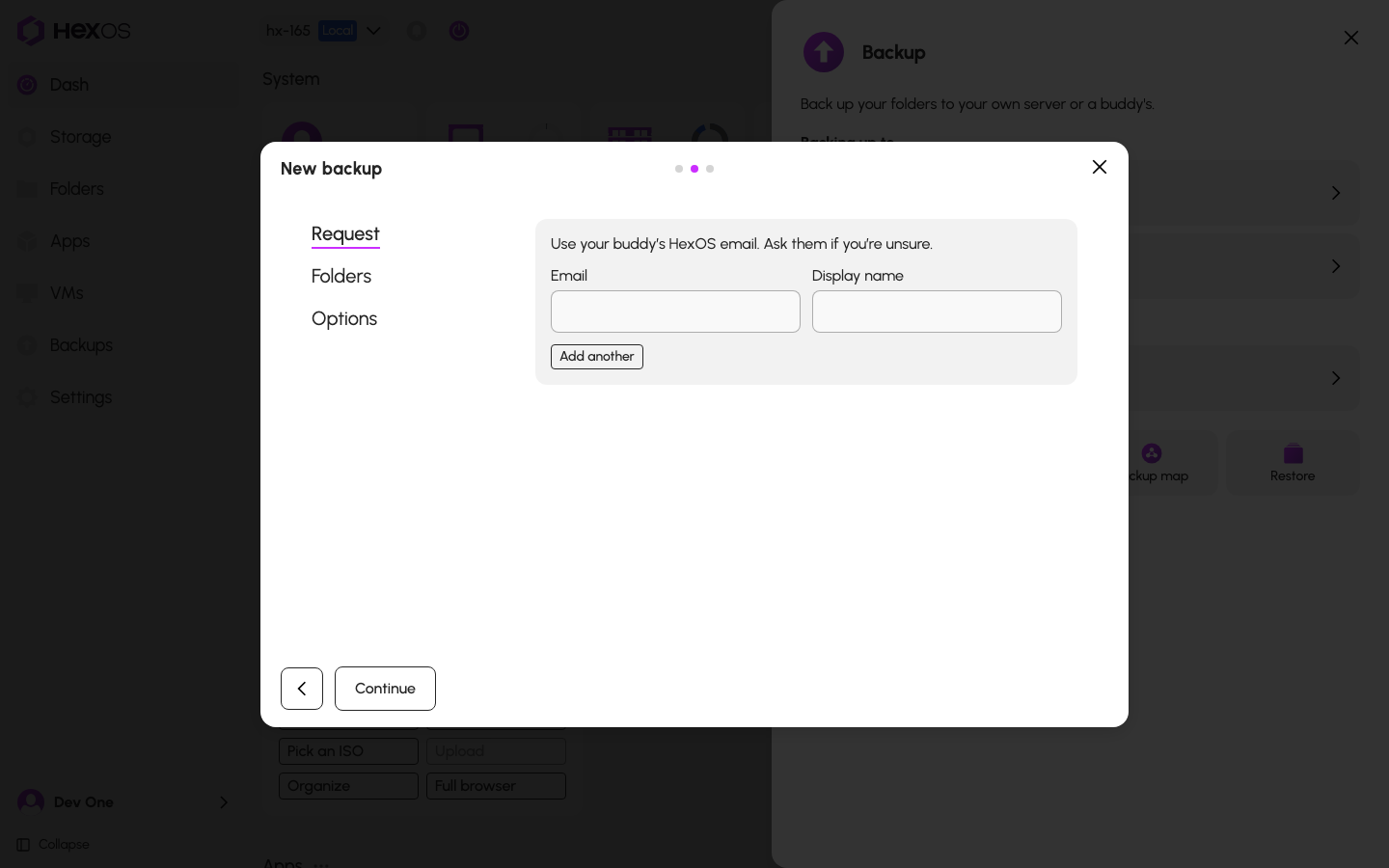
HexOS stops you if something is wrong with an address. For example, "You can't send a backup request to yourself." If a buddy already stores a backup of this server, it says "This buddy already hosts a backup for this server. Expand its storage instead."
¶ Folders
- Under Folders (optional), choose the folders to back up. You can also skip this and add folders later.
- Under "Choose how much storage to request.", check the amount. You can switch between GB and TB.
- Click Continue.
The Folders step
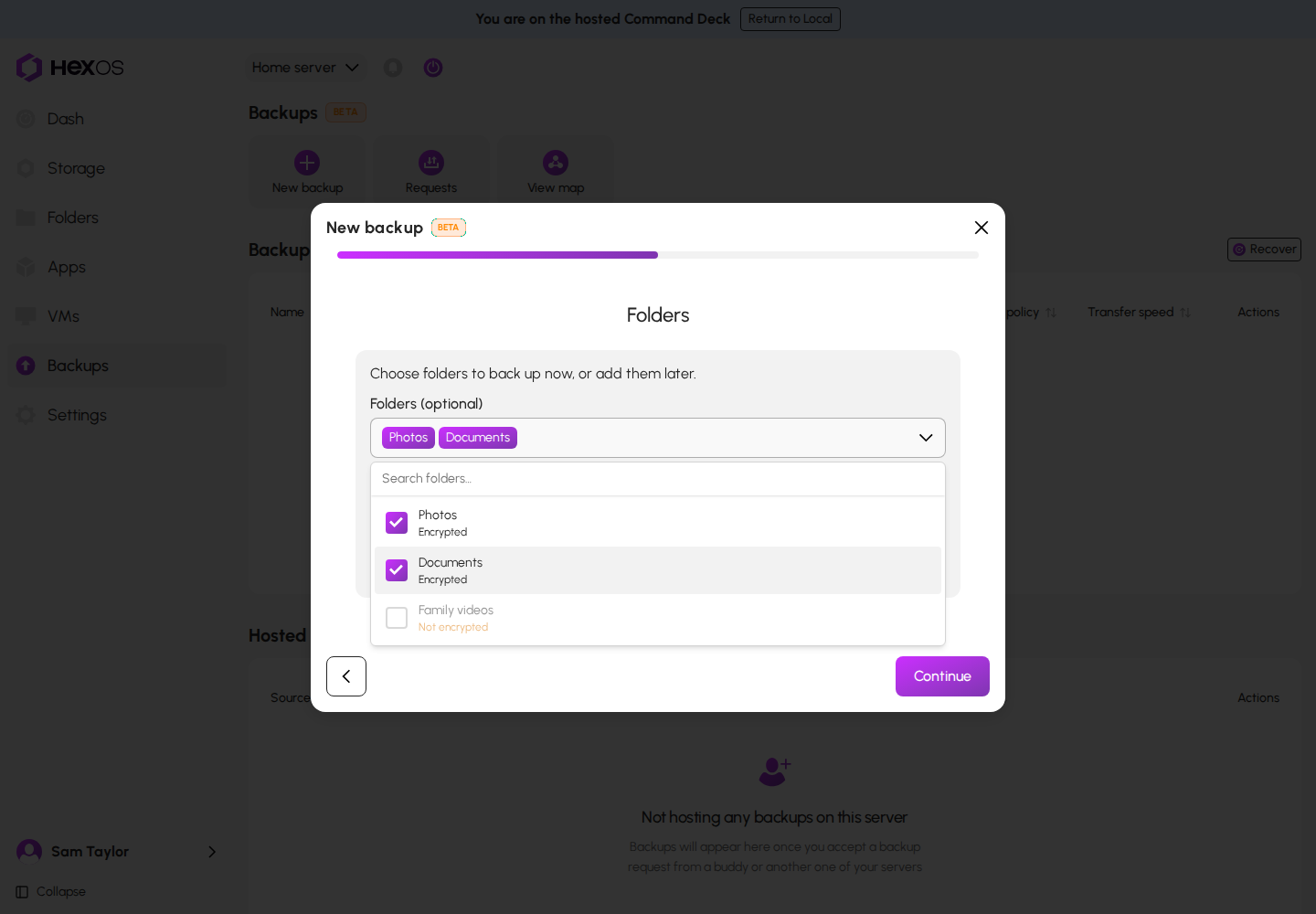
Only encrypted folders can be chosen for a buddy. A folder that is not encrypted shows "Not encrypted" and cannot be picked.
HexOS suggests an amount of storage from the folders you chose, with room to grow. It says "Suggested based on your selected folders." You can ask for more. You cannot ask for much less: below the minimum, it says "Must be at least" and the smallest amount. Backups are stored compressed, so the copy is often smaller than your files. See Compression.
¶ Options
- Under Transfer speed, choose Full speed, Smart, or Custom. Smart is chosen to start with.
- Under Schedule, choose Weekly or Daily, then the Day and Time. The wizard starts on Weekly, Sunday at 23:00. Backups run on your server's local time.
- Under Keep restore points for, choose how long to keep restore points. The wizard starts on 2 weeks.
- Click Continue.
The Options step
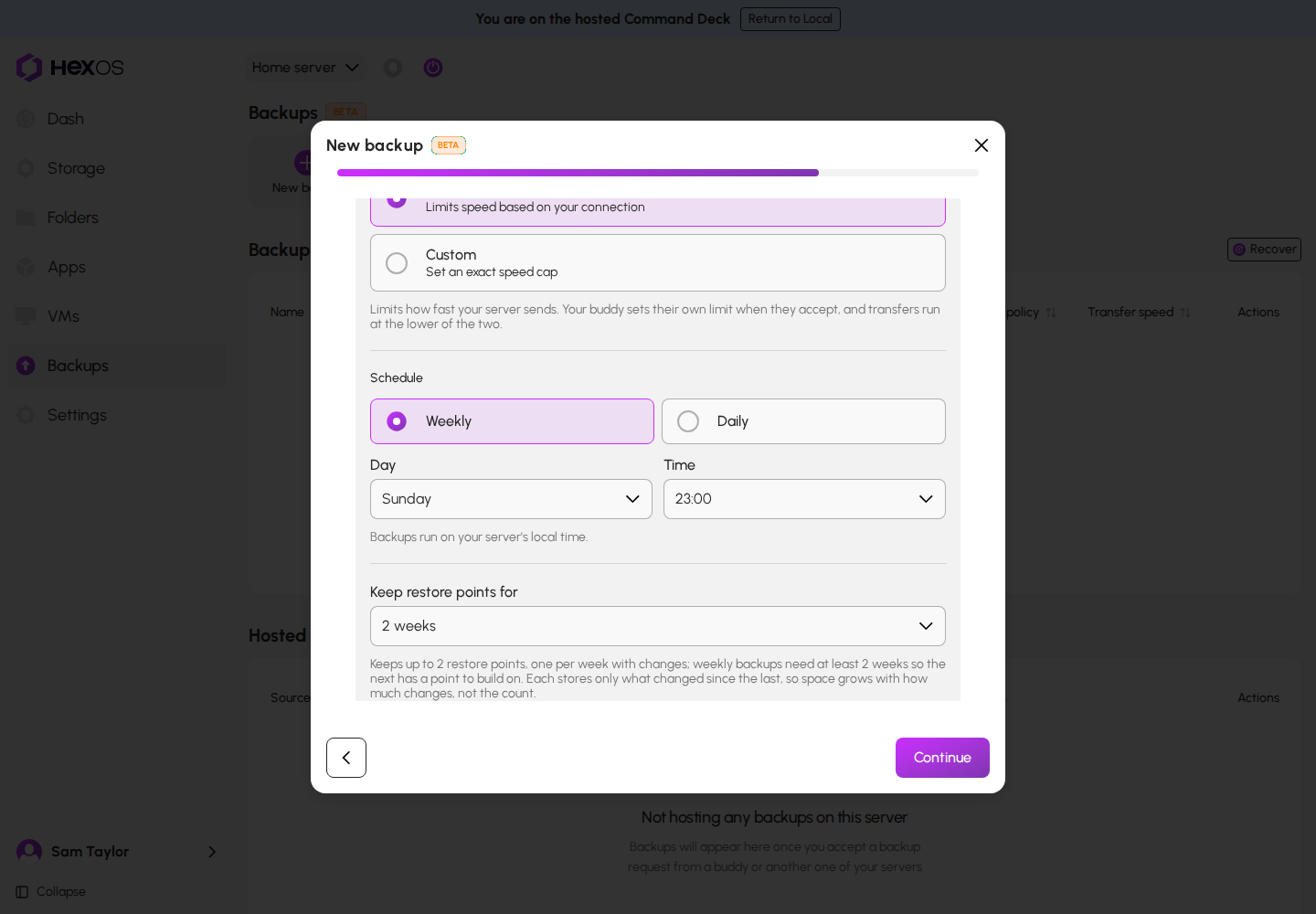
Under Keep restore points for, a note says how many restore points that keeps at most: one for each week, day, or hour with changes. Each one stores only what changed since the one before, so the space they take depends on how much changes, not on how many there are.
Your speed setting limits how fast your server sends. Your buddy sets their own limit when they accept, and transfers run at the lower of the two.
¶ Review
Check the summary, then click Send request (or Send requests for more than one buddy).
The Review step
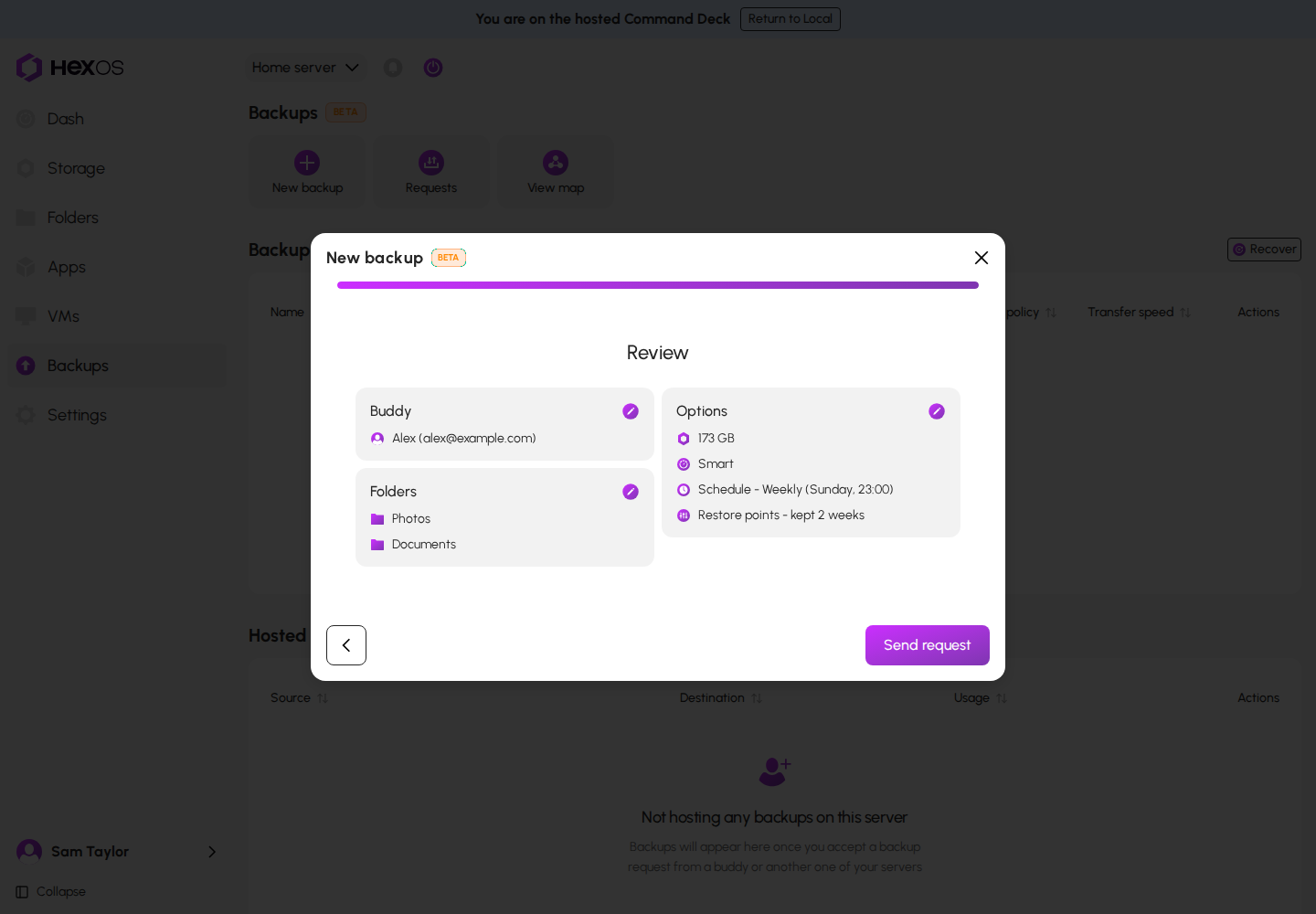
HexOS confirms with "Sent 1 backup request". Your request waits on the Backups page under Requests > Outgoing requests. Until your buddy answers, you can click Withdraw there, then Withdraw request to confirm.
Warning: HexOS does not email your buddy. The request shows on their Backups page under Requests, as a dot on Backups in their sidebar, and in their activity center. Message your buddy and ask them to accept it.
Info: A request to an email address with no HexOS account waits. There is no error and it does not expire. It reaches that person when they sign in to HexOS with that email. Check the spelling before you send.
Nothing is copied until your buddy accepts. When they accept, HexOS sets the space aside on their pool and sets up the connection. See Host a buddy's backup for what your buddy sees.
¶ Back up to another server you own
The steps are Server, Folders, Options, and Review.
¶ Server
- Choose the destination under Server. Only online servers are listed.
- Choose the Pool on that server.
- To back up to more than one of your servers at once, click Add another.
- Click Continue.
The Server step
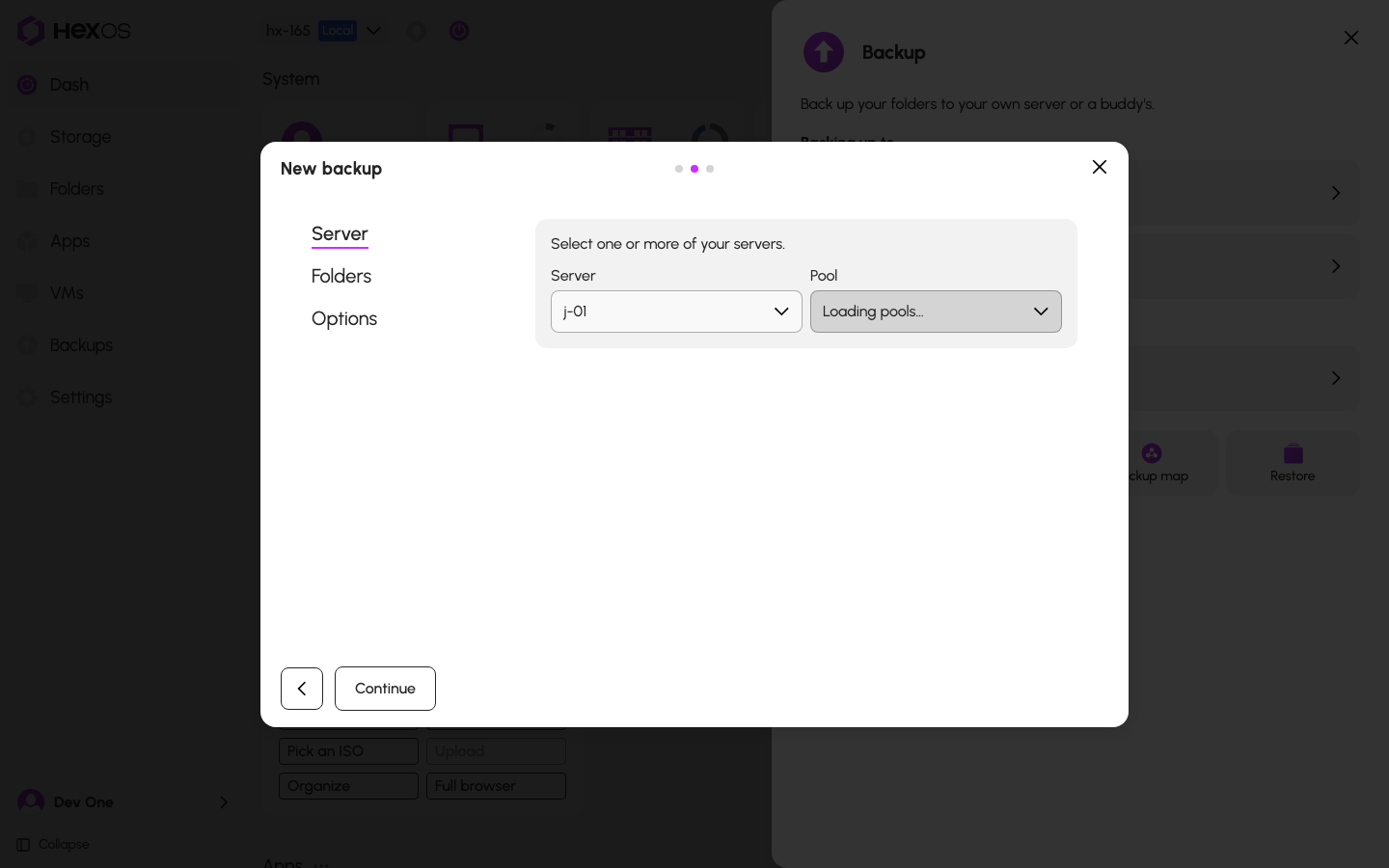
If you have no other server online, the first step says "You don't have any other servers setup yet". If each of your other online servers already stores a backup of this server, it says "You don't have any other servers to backup to".
¶ Folders
Choose the folders the same way as for a buddy. Any folder can be chosen, encrypted or not. Under "Choose how much storage to reserve.", set the amount. The same amount is set aside on every server you chose. If a pool is too small, the step says so.
¶ Options
The options are the same as for a buddy, with one more schedule: Hourly, at the top of every hour. Hourly is only offered between your own servers.
¶ Review
Check the summary, then click Create connection (or Create connections). HexOS confirms with "Started 1 backup". No request is needed, because you own both servers.
¶ Back up from a folder's page
You can also start from the folder itself.
- In the sidebar, click Folders, then click the folder.
- Click Backup.
- In the dialog, choose one or more of your backups. A backup that cannot take this folder is greyed out with the reason, for example "Not enough space left in this connection."
- Click Back up folder.
The folder's Backup dialog
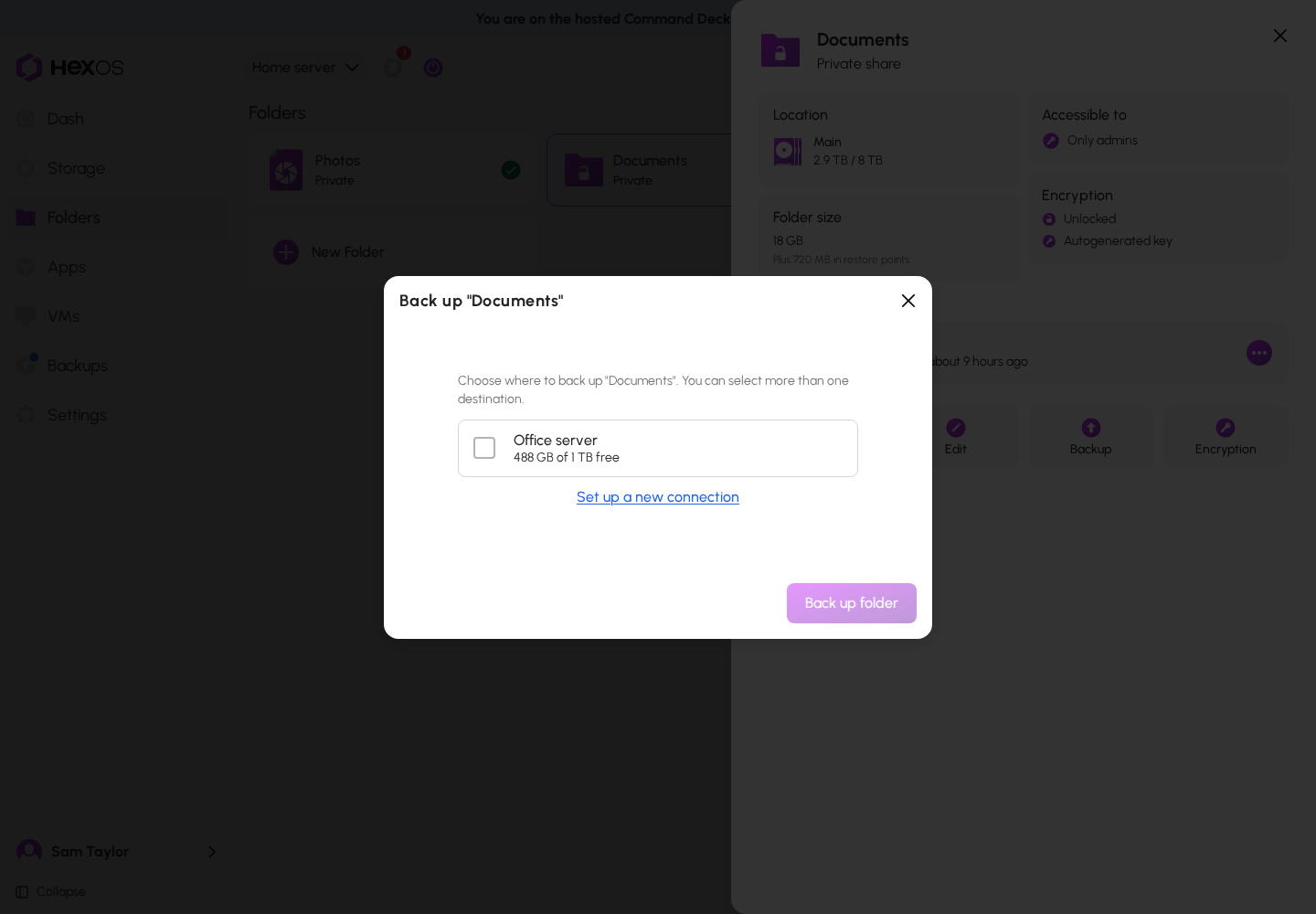
To send the folder somewhere new, click Set up a new connection. The setup wizard opens with this folder already chosen.
If the folder is not encrypted, the dialog explains that it cannot go to a buddy yet, with an Encrypt folder… button. When encryption finishes, HexOS adds the folder to those backups for you.
¶ While setup runs
Setup usually takes a few minutes. The activity center shows each step: Connecting servers, Authorizing transfer, Preparing storage, Securing connection, and Finishing up. You can close the activity item. Setup keeps going.
Setup needs both servers online. If one is offline, setup waits and continues on its own once that server is back. Meanwhile, the backup's row on the Backups page shows a pause icon.
If a step fails while both servers are online, HexOS tries again on its own, first within about 10 minutes and then less often after each failure. After about a day of failures it stops, and the activity item says "Stopped trying automatically after several failed attempts." To try again sooner, or after it stops:
- In the activity item, click Retry now. To stop instead, click Cancel setup, then Cancel setup again in "Cancel this backup setup?".
- On the backup's page, click Retry next to the error.
- On the Backups page, open the row's menu and click Retry setup.
A retry from any of these starts the automatic tries over. Cancelling removes the connection. On a new backup, no backed-up data is lost, because nothing was backed up yet. If you host the backup, use Retry on the backup's page. The row menu's Retry setup is only on the sending side.
¶ The first backup
When setup finishes, each folder you chose starts its first backup on its own. The first backup copies everything, so it takes the longest. While it runs, the folder's row shows "Backing up…" and a percentage. After that, each backup sends only what changed.
When it finishes, the folder's row shows "Latest changes backed-up:" and the time.
To change the schedule or how long restore points are kept, use the backup's Schedule tile. See Manage your backups.
Help: Setup stuck, or a message you do not recognize? See Backup troubleshooting or ask in the HexOS Discord Community.